> ## Documentation Index
> Fetch the complete documentation index at: https://documentation.outpost.pub/llms.txt
> Use this file to discover all available pages before exploring further.
# Basic Autoresponder
> Pre-built automated email actions for onboarding, retention, renewals, cancellations, gifts, events, and more — designed to work with Ghost and Stripe.
The Basic Autoresponder contains 66 pre-built email actions that send the right email at the right time: welcoming new subscribers, reminding members before renewals, recovering cancelled subscriptions with offers, thanking donors, and more.
 Go to **Autoresponder → Basic** to manage the pre-built actions. For custom multi-step flows, see the [Advanced Autoresponder](/features/advanced-autoresponder).
## The Big Off/On Button
The Basic Autoresponder has a master toggle labeled **"The Big Off/On Button."** When it's off, every Basic action is disabled regardless of individual toggles.
Go to **Autoresponder → Basic** to manage the pre-built actions. For custom multi-step flows, see the [Advanced Autoresponder](/features/advanced-autoresponder).
## The Big Off/On Button
The Basic Autoresponder has a master toggle labeled **"The Big Off/On Button."** When it's off, every Basic action is disabled regardless of individual toggles.
 The [Advanced Autoresponder](/features/advanced-autoresponder) and the Failed Payment Flow each have their own independent master toggles.
## Pre-built actions
The Basic Autoresponder contains **66 pre-built email actions** organized across 6 tabs. Each action is pre-configured with a default email template, timing, and (where appropriate) a discount offer.
You can change the wording, styling, timing, offer, or turn individual actions on or off. We recommend changing the email template to make the messages match your voice.
### How email timing works
```mermaid theme={"theme":{"light":"github-light","dark":"github-dark"}}
flowchart LR
E([Triggering event
The [Advanced Autoresponder](/features/advanced-autoresponder) and the Failed Payment Flow each have their own independent master toggles.
## Pre-built actions
The Basic Autoresponder contains **66 pre-built email actions** organized across 6 tabs. Each action is pre-configured with a default email template, timing, and (where appropriate) a discount offer.
You can change the wording, styling, timing, offer, or turn individual actions on or off. We recommend changing the email template to make the messages match your voice.
### How email timing works
```mermaid theme={"theme":{"light":"github-light","dark":"github-dark"}}
flowchart LR
E([Triggering event
e.g. signup, upgrade,
failed payment]) --> M{Action
matches event?}
M -- no --> X([no email])
M -- yes --> D{Within 60-min
dedupe window?}
D -- yes --> X
D -- no --> T[Apply timing
Immediate / 2-min /
configured delay]
T --> S([Send email])
```
Most autoresponder emails are sent with a **2-minute delay** after the triggering event. This handles the case where a member toggles a setting twice in quick succession — Outpost only sends once the dust has settled. Gift subscription and donation emails are the exceptions and send immediately.
### Duplicate prevention
Outpost includes two layers of duplicate prevention to avoid sending the same email more than once:
* **60-minute deduplication**: The same action won't send the same template to the same member twice within 60 minutes. Important to know when testing — if you send a test and then trigger the action again within an hour, the second email will be silently skipped.
* **One-month deduplication for scheduled actions**: Actions that run on a schedule (such as card expiration reminders and cart-reminder nudge emails) check whether the same template was already sent to the member within the past calendar month. This prevents subscribers from receiving the same recurring reminder repeatedly.
### How Action Items work
Each Action Item has these controls:
| Control | Description |
| ------------------ | ---------------------------------------------------------------------------------------------------------------------------------------------------------- |
| **Action** | Description of what triggers this email (with info tooltip) |
| **Timing** | When to send: "Immediate," "Auto-Spaced," or a configurable delay (e.g., 3 Days, 1 Week) |
| **Email Template** | Which template to use. Click the eye icon to preview. Some actions show "Different Messages for Each Tier" with an Edit button for per-tier customization. |
| **Offer** | Optional discount offer to include in the email. Click to select from existing Ghost Offers or Outpost Offers, or create a new one. |
| **Off/On** | Toggle to enable or disable this specific action |
Some Action Items display performance stats below them: **Sent**, **Opened %**, **Clicked %**, **Converted %**, and **Revenue**.
#### About Auto-Spaced timing
Some flows run over a window whose length depends on the member, not a fixed schedule. Free trials are the clearest case — you might run a 7-day trial on one offer, a 10-day trial on another, and a 14-day trial on a third, all sharing the same flow.
Setting an Action Item to **Auto-Spaced** tells Outpost to compute the send time from *this member's* window rather than a fixed delay. With three trial reminders, that means:
* On a 7-day trial → reminders land roughly every 2 days
* On a 10-day trial → reminders land roughly every 3 days
* On a 14-day trial → reminders land roughly every 4–5 days
You set the flow up once, and the timing adapts to whichever trial the member is on. Auto-Spaced is currently used for the trial reminder rows; other Action Items use **Immediate** or a fixed delay like *3 Days* or *1 Week*.
#### Selecting offers
Click the offer cell on any action to open the offer selector. It has two tabs:
* **Ghost Offers** — existing Ghost Offers from your site, plus an option to create a new one.
* **Outpost Offers** — existing Outpost Offers organized by product, plus an option to create a new one.
Reusing an existing offer keeps your Ghost and Outpost offer lists clean and makes it easy to apply the same discount across multiple actions. See [Ghost Offers vs Outpost Promotions](/features/offers-and-discounts#ghost-offers-vs-outpost-promotions) for guidance on when to use each.
At the bottom of the page, a red **"Restore Default Templates and Actions"** button resets every action and template in the Basic Autoresponder to factory defaults.
***
## Welcome Flow tab
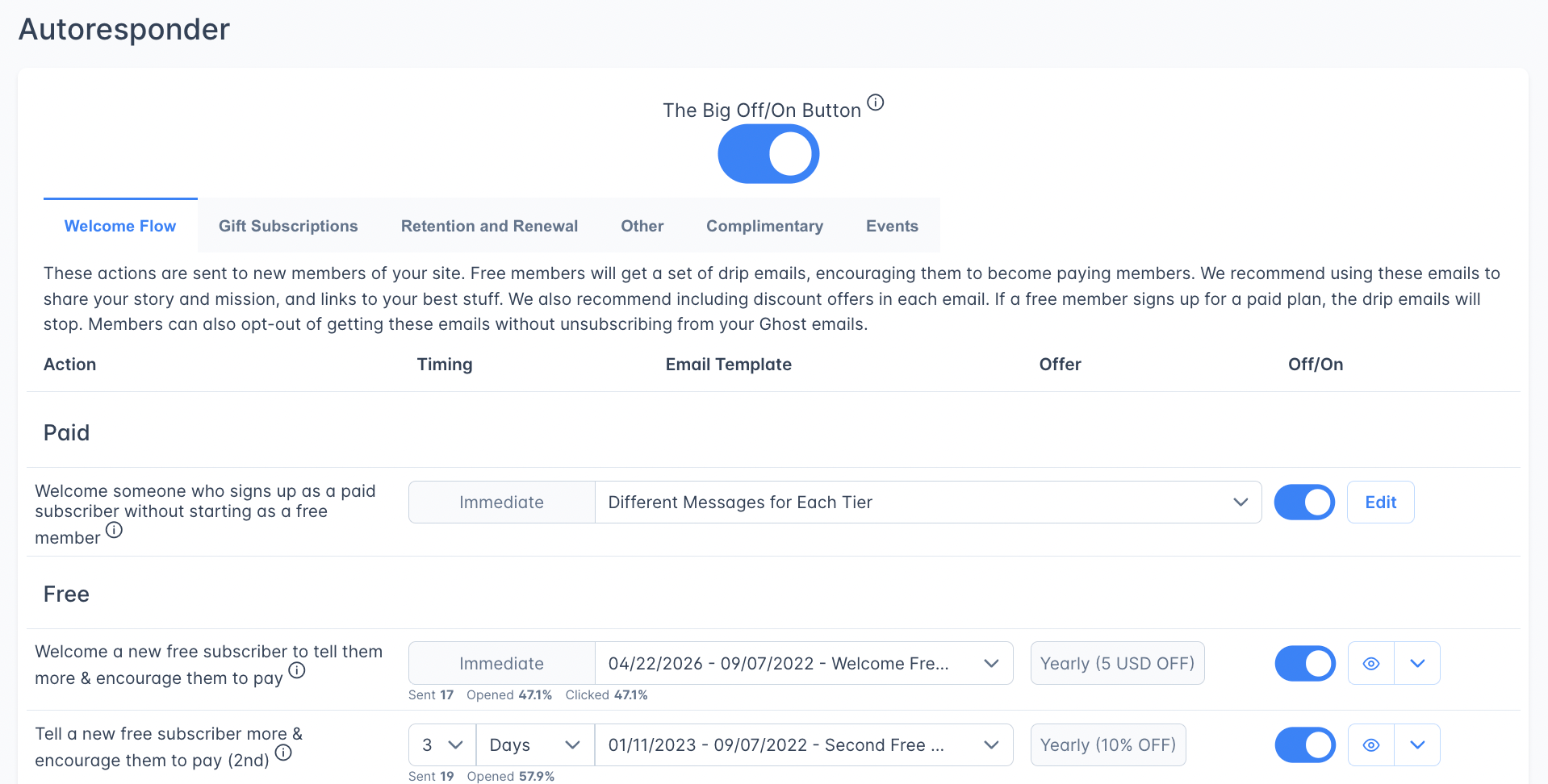
These emails greet new members and encourage free subscribers to upgrade. If a free member converts to paid, the drip sequence automatically stops. Members can opt out of drip emails without unsubscribing from your Ghost newsletter.
You can bring members in without triggering this welcome flow — useful when importing a list or adding members who shouldn't receive these emails. See [Skipping Welcome Emails](/faq/skipping-welcome-emails).
 #### Paid section (1 action)
A combined welcome and thank-you for members who sign up directly as paid, skipping the free tier.
| Action | Timing | Notes |
| ----------------------------------------------------------------------------------- | --------- | -------------------------- |
| Welcome someone who signs up as a paid subscriber without starting as a free member | Immediate | Supports per-tier messages |
#### Free section (5 actions — drip sequence)
A welcome drip series that progressively encourages free subscribers to upgrade. The single highest-impact lever for free-to-paid conversion. Spend time on these.
| # | Action | Default Timing |
| - | ------------------------------------------------------- | -------------- |
| 1 | Welcome a new free subscriber and encourage them to pay | Immediate |
| 2 | Second encouragement to pay | 3 Days |
| 3 | Third encouragement to pay | 5 Days |
| 4 | Fourth encouragement to pay | 1 Week |
| 5 | Fifth encouragement to pay | 2 Weeks |
Each email in the drip sequence can include a different discount offer. Sequences typically perform better when each step uses a steeper discount than the one before.
#### Trial section (3 actions)
Trial subscriptions come in two flavors, and both fire this set of actions:
* **Tier-wide trials** — a tier is configured in Ghost with a default free-trial period, so everyone who signs up on that tier starts on a trial.
* **Offer-based trials** — a specific [Outpost Promotion](/features/promotions) (or Ghost Offer) adds a trial to a single tier without making it the default for everyone.
This trial welcome flow is **separate from the regular welcome flow**. A new free-trial member receives this trial reminder sequence — they do **not** receive the standard paid-tier welcome email until the trial converts and they actually start paying.
| # | Action | Default Timing |
| - | ------------------------------------------ | -------------- |
| 1 | Send reminder to someone on a trial period | Immediate |
| 2 | Second trial reminder | Auto-Spaced |
| 3 | Third trial reminder | Auto-Spaced |
These reminders use **Auto-Spaced** timing so they distribute evenly across whatever trial length applies — see [About Auto-Spaced timing](#about-auto-spaced-timing). You can override the first and third reminders to fixed timings (e.g., "send 24 hours before the trial ends") if you want precise control; the middle reminder always stays Auto-Spaced so it lands sensibly regardless of trial length.
#### Group Subscriptions section (2 actions)
| Action | Timing |
| -------------------------------------------------------- | --------- |
| Welcome someone who bought a group subscription | Immediate |
| Welcome someone who accepted a group subscription invite | Immediate |
#### Institutional Subscription section (1 action)
| Action | Timing |
| --------------------------------------------------------------------------------------------------- | --------- |
| Notify someone whose email matches an institutional subscription that they've been upgraded to paid | Immediate |
***
## Gift Subscriptions tab
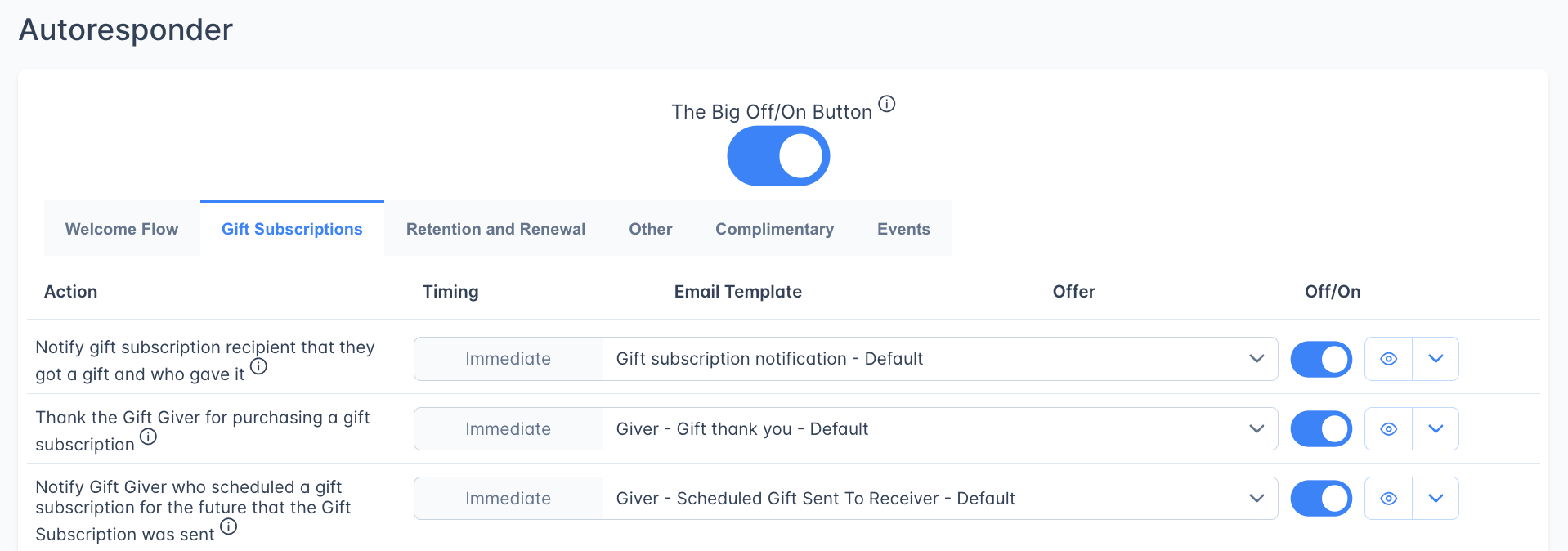
7 actions covering both the gift giver and the gift recipient. These cover the cycle from thank you, to acceptance, to letting the giver have the option to give again, and the getter to buy their own.
#### Paid section (1 action)
A combined welcome and thank-you for members who sign up directly as paid, skipping the free tier.
| Action | Timing | Notes |
| ----------------------------------------------------------------------------------- | --------- | -------------------------- |
| Welcome someone who signs up as a paid subscriber without starting as a free member | Immediate | Supports per-tier messages |
#### Free section (5 actions — drip sequence)
A welcome drip series that progressively encourages free subscribers to upgrade. The single highest-impact lever for free-to-paid conversion. Spend time on these.
| # | Action | Default Timing |
| - | ------------------------------------------------------- | -------------- |
| 1 | Welcome a new free subscriber and encourage them to pay | Immediate |
| 2 | Second encouragement to pay | 3 Days |
| 3 | Third encouragement to pay | 5 Days |
| 4 | Fourth encouragement to pay | 1 Week |
| 5 | Fifth encouragement to pay | 2 Weeks |
Each email in the drip sequence can include a different discount offer. Sequences typically perform better when each step uses a steeper discount than the one before.
#### Trial section (3 actions)
Trial subscriptions come in two flavors, and both fire this set of actions:
* **Tier-wide trials** — a tier is configured in Ghost with a default free-trial period, so everyone who signs up on that tier starts on a trial.
* **Offer-based trials** — a specific [Outpost Promotion](/features/promotions) (or Ghost Offer) adds a trial to a single tier without making it the default for everyone.
This trial welcome flow is **separate from the regular welcome flow**. A new free-trial member receives this trial reminder sequence — they do **not** receive the standard paid-tier welcome email until the trial converts and they actually start paying.
| # | Action | Default Timing |
| - | ------------------------------------------ | -------------- |
| 1 | Send reminder to someone on a trial period | Immediate |
| 2 | Second trial reminder | Auto-Spaced |
| 3 | Third trial reminder | Auto-Spaced |
These reminders use **Auto-Spaced** timing so they distribute evenly across whatever trial length applies — see [About Auto-Spaced timing](#about-auto-spaced-timing). You can override the first and third reminders to fixed timings (e.g., "send 24 hours before the trial ends") if you want precise control; the middle reminder always stays Auto-Spaced so it lands sensibly regardless of trial length.
#### Group Subscriptions section (2 actions)
| Action | Timing |
| -------------------------------------------------------- | --------- |
| Welcome someone who bought a group subscription | Immediate |
| Welcome someone who accepted a group subscription invite | Immediate |
#### Institutional Subscription section (1 action)
| Action | Timing |
| --------------------------------------------------------------------------------------------------- | --------- |
| Notify someone whose email matches an institutional subscription that they've been upgraded to paid | Immediate |
***
## Gift Subscriptions tab
7 actions covering both the gift giver and the gift recipient. These cover the cycle from thank you, to acceptance, to letting the giver have the option to give again, and the getter to buy their own.
 | # | Action | Timing |
| - | ----------------------------------------------------------------------------------------- | --------- |
| 1 | Notify gift recipient that they received a gift and who sent it | Immediate |
| 2 | Thank the gift giver for purchasing | Immediate |
| 3 | Notify gift giver that a scheduled gift was sent to the recipient | Immediate |
| 4 | Notify gift giver that the gift ends soon — encourage them to give another year (1st) | Immediate |
| 5 | Notify gift giver that the gift ends soon (2nd) | Immediate |
| 6 | Notify gift giver that the gift ends soon (3rd) | Immediate |
| 7 | Notify gift recipient that their subscription ends soon — encourage them to buy their own | Immediate |
***
## Retention and Renewal tab
15 actions organized across 7 sections. **This is the most critical tool for reducing voluntary churn.**
| # | Action | Timing |
| - | ----------------------------------------------------------------------------------------- | --------- |
| 1 | Notify gift recipient that they received a gift and who sent it | Immediate |
| 2 | Thank the gift giver for purchasing | Immediate |
| 3 | Notify gift giver that a scheduled gift was sent to the recipient | Immediate |
| 4 | Notify gift giver that the gift ends soon — encourage them to give another year (1st) | Immediate |
| 5 | Notify gift giver that the gift ends soon (2nd) | Immediate |
| 6 | Notify gift giver that the gift ends soon (3rd) | Immediate |
| 7 | Notify gift recipient that their subscription ends soon — encourage them to buy their own | Immediate |
***
## Retention and Renewal tab
15 actions organized across 7 sections. **This is the most critical tool for reducing voluntary churn.**
 #### Renewal Thank You (1 action)
Thanks members who renewed for another year.
| Action | Timing |
| --------------------------------------------------- | --------- |
| Thank an annual member who renewed for another year | Immediate |
#### Renewal Reminders (2 actions)
Due to consumer protection laws in many jurisdictions, we strongly recommend sending renewal reminders at least 30 days and 7 days before a subscription renews. Surprise charges can lead to chargebacks, which are expensive and harmful to your Stripe account.
| # | Action | Default Timing |
| - | ----------------------------------------------------------------------- | -------------- |
| 1 | Remind non-monthly subscriber that their subscription renews in 30 days | 1 Month |
| 2 | Remind non-monthly subscriber that their subscription renews in 7 days | 1 Week |
#### Early Cancellation Acknowledgment (1 action)
When a subscriber cancels auto-renewal more than 45 days before their subscription expires, it usually means they simply don't want to be auto-charged — not that they're unhappy right now. Rather than hitting them with a hard-sell retention offer immediately, this email acknowledges their preference, confirms they won't be auto-renewed, and lets them know to expect special offers as their expiration date approaches.
| Action | Default Timing |
| ---------------------------------------------------------------------------------------- | -------------- |
| Notify an annual subscriber who cancels auto-renewal more than 45 days before expiration | Immediate |
#### Handling Cancellations with Retention Offers (7 actions)
We recommend offering an annual upgrade discount to monthly subscribers who cancel. Different discount levels are worth testing.
| # | Action | Default Timing |
| - | ------------------------------------------------------------------------------------------------ | -------------- |
| 1 | Ask an annual subscriber who cancels within 45 days of renewal to reconsider (per-tier messages) | Immediate |
| 2 | Send a note to a monthly subscriber who cancels with a special offer | Immediate |
| 3 | First reminder to cancelled subscriber that their access ends soon | 5 Days |
| 4 | Second reminder to cancelled subscriber | 2 Days |
| 5 | Third and final reminder to cancelled subscriber | 1 Day |
| 6 | Thank subscriber for using a retention offer (with prorate) | Immediate |
| 7 | Thank subscriber for using a retention offer (new subscription starts after current one ends) | Immediate |
Cancellation reminders 3, 4, and 5 are timed relative to the subscription end date, creating an escalating urgency sequence. Each can include a discount offer.
Rows 6 and 7 are the confirmation emails for upgrade offers redeemed by existing subscribers. If you offer upgrades or plan changes to current paid members, turn both on — especially row 7, since a scheduled second subscription may not show in Ghost Portal. See [Upgrading Existing Subscribers](/features/upgrading-existing-subscribers#turn-on-the-upgrade-confirmation-email).
#### Unsubscribes (2 actions)
Historically Ghost didn't distinguish clearly between unsubscribing from email and cancelling auto-renewal. These emails surface that difference and confirm a full unsubscribe when one happens.
| Action | Timing |
| -------------------------------------------------------------------------------------------- | --------- |
| Tell a paid subscriber who unsubscribes from all emails that they're still a paying customer | Immediate |
| Send a note to a free member who unsubscribes from all emails | Immediate |
#### Failed Payment Flow Thank You (1 action)
A short thank-you to a member who updated their card after a failed renewal.
| Action | Timing |
| ------------------------------------------------------------------------------------------------------------ | --------- |
| Thank a member who updated their payment method via the [Failed Payment Flow](/features/failed-payment-flow) | Immediate |
#### Card Reminders (1 action)
Stripe flags cards it predicts will fail at renewal. This action gives those members a chance to update before then. Stripe's predictions aren't always right — some flagged cards still work at renewal.
| Action | Timing |
| ------------------------------------------------------------ | ------ |
| Remind a subscriber that their payment card is expiring soon | 1 Week |
***
## Other tab
Actions covering upgrades, donations, nudges, group subscription management, and integration notifications.
#### Renewal Thank You (1 action)
Thanks members who renewed for another year.
| Action | Timing |
| --------------------------------------------------- | --------- |
| Thank an annual member who renewed for another year | Immediate |
#### Renewal Reminders (2 actions)
Due to consumer protection laws in many jurisdictions, we strongly recommend sending renewal reminders at least 30 days and 7 days before a subscription renews. Surprise charges can lead to chargebacks, which are expensive and harmful to your Stripe account.
| # | Action | Default Timing |
| - | ----------------------------------------------------------------------- | -------------- |
| 1 | Remind non-monthly subscriber that their subscription renews in 30 days | 1 Month |
| 2 | Remind non-monthly subscriber that their subscription renews in 7 days | 1 Week |
#### Early Cancellation Acknowledgment (1 action)
When a subscriber cancels auto-renewal more than 45 days before their subscription expires, it usually means they simply don't want to be auto-charged — not that they're unhappy right now. Rather than hitting them with a hard-sell retention offer immediately, this email acknowledges their preference, confirms they won't be auto-renewed, and lets them know to expect special offers as their expiration date approaches.
| Action | Default Timing |
| ---------------------------------------------------------------------------------------- | -------------- |
| Notify an annual subscriber who cancels auto-renewal more than 45 days before expiration | Immediate |
#### Handling Cancellations with Retention Offers (7 actions)
We recommend offering an annual upgrade discount to monthly subscribers who cancel. Different discount levels are worth testing.
| # | Action | Default Timing |
| - | ------------------------------------------------------------------------------------------------ | -------------- |
| 1 | Ask an annual subscriber who cancels within 45 days of renewal to reconsider (per-tier messages) | Immediate |
| 2 | Send a note to a monthly subscriber who cancels with a special offer | Immediate |
| 3 | First reminder to cancelled subscriber that their access ends soon | 5 Days |
| 4 | Second reminder to cancelled subscriber | 2 Days |
| 5 | Third and final reminder to cancelled subscriber | 1 Day |
| 6 | Thank subscriber for using a retention offer (with prorate) | Immediate |
| 7 | Thank subscriber for using a retention offer (new subscription starts after current one ends) | Immediate |
Cancellation reminders 3, 4, and 5 are timed relative to the subscription end date, creating an escalating urgency sequence. Each can include a discount offer.
Rows 6 and 7 are the confirmation emails for upgrade offers redeemed by existing subscribers. If you offer upgrades or plan changes to current paid members, turn both on — especially row 7, since a scheduled second subscription may not show in Ghost Portal. See [Upgrading Existing Subscribers](/features/upgrading-existing-subscribers#turn-on-the-upgrade-confirmation-email).
#### Unsubscribes (2 actions)
Historically Ghost didn't distinguish clearly between unsubscribing from email and cancelling auto-renewal. These emails surface that difference and confirm a full unsubscribe when one happens.
| Action | Timing |
| -------------------------------------------------------------------------------------------- | --------- |
| Tell a paid subscriber who unsubscribes from all emails that they're still a paying customer | Immediate |
| Send a note to a free member who unsubscribes from all emails | Immediate |
#### Failed Payment Flow Thank You (1 action)
A short thank-you to a member who updated their card after a failed renewal.
| Action | Timing |
| ------------------------------------------------------------------------------------------------------------ | --------- |
| Thank a member who updated their payment method via the [Failed Payment Flow](/features/failed-payment-flow) | Immediate |
#### Card Reminders (1 action)
Stripe flags cards it predicts will fail at renewal. This action gives those members a chance to update before then. Stripe's predictions aren't always right — some flagged cards still work at renewal.
| Action | Timing |
| ------------------------------------------------------------ | ------ |
| Remind a subscriber that their payment card is expiring soon | 1 Week |
***
## Other tab
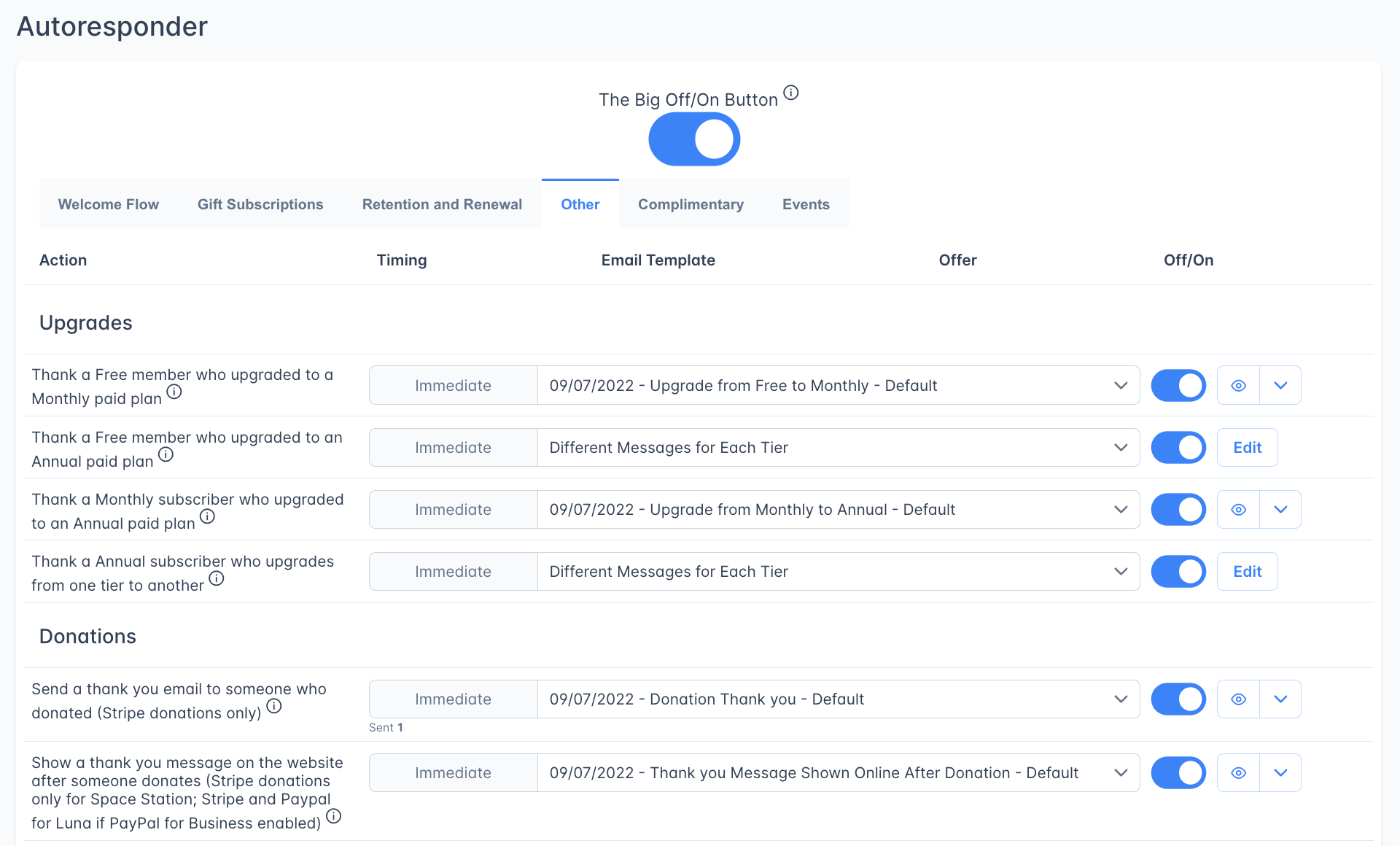
Actions covering upgrades, donations, nudges, group subscription management, and integration notifications.
 #### Thank You for Upgrades (4 actions)
| # | Action | Timing | Notes |
| - | ------------------------------------------------- | --------- | ----------------- |
| 1 | Thank a free member who upgraded to monthly | Immediate | Per-tier messages |
| 2 | Thank a free member who upgraded to annual | Immediate | |
| 3 | Thank a monthly subscriber who upgraded to annual | Immediate | |
| 4 | Thank an annual subscriber who upgrades tiers | Immediate | Per-tier messages |
#### Donations (2 actions)
| Action | Timing | Notes |
| ----------------------------------------------------- | --------- | ----------------------------------------------------------------- |
| Send a thank-you email after a Stripe donation | Immediate | |
| Show a thank-you message on the site after a donation | Immediate | Stripe only on Space Station Plan; Stripe and PayPal on Luna Plan |
#### Nudge (1 action)
An abandoned-cart message. Sent at most once every 30 days per subscriber.
| Action | Default Timing |
| ---------------------------------------------------------------------------- | -------------- |
| Send a reminder to someone who clicked an offer but didn't complete checkout | 1 Hour |
This action automatically uses the offer the reader originally clicked on.
#### Group Subscriptions (5 actions)
| Action | Timing |
| --------------------------------------------- | --------- |
| Send invite email from the group buyer | Immediate |
| Send invite reminder | 2 Days |
| Notify group buyer when an invite is accepted | Immediate |
| Notify group buyer about an unaccepted invite | 3 Days |
| Remind group buyer about remaining open seats | 1 Week |
#### Integrations (6 actions)
Some integrations rely on a notification email to confirm or reflect access changes.
| Action | Timing | Default State |
| ------------------------------------------------------- | --------- | ------------- |
| FeedPress: Welcome — notify of private RSS feed | Immediate | ON |
| FeedPress: Benefit removed — notify feed access revoked | Immediate | OFF |
| Supercast: Welcome — notify of paid podcast feed | Immediate | ON |
| Supercast: Welcome (invite-only) | Immediate | ON |
| Supercast: Benefit removed | Immediate | OFF |
| Transistor FM: Benefit removed | Immediate | OFF |
***
## Events tab
6 actions tied to the [Events](/features/events) feature. Events require specialized code in your theme and event emails must be enabled in **Event Settings**.
#### Thank You for Upgrades (4 actions)
| # | Action | Timing | Notes |
| - | ------------------------------------------------- | --------- | ----------------- |
| 1 | Thank a free member who upgraded to monthly | Immediate | Per-tier messages |
| 2 | Thank a free member who upgraded to annual | Immediate | |
| 3 | Thank a monthly subscriber who upgraded to annual | Immediate | |
| 4 | Thank an annual subscriber who upgrades tiers | Immediate | Per-tier messages |
#### Donations (2 actions)
| Action | Timing | Notes |
| ----------------------------------------------------- | --------- | ----------------------------------------------------------------- |
| Send a thank-you email after a Stripe donation | Immediate | |
| Show a thank-you message on the site after a donation | Immediate | Stripe only on Space Station Plan; Stripe and PayPal on Luna Plan |
#### Nudge (1 action)
An abandoned-cart message. Sent at most once every 30 days per subscriber.
| Action | Default Timing |
| ---------------------------------------------------------------------------- | -------------- |
| Send a reminder to someone who clicked an offer but didn't complete checkout | 1 Hour |
This action automatically uses the offer the reader originally clicked on.
#### Group Subscriptions (5 actions)
| Action | Timing |
| --------------------------------------------- | --------- |
| Send invite email from the group buyer | Immediate |
| Send invite reminder | 2 Days |
| Notify group buyer when an invite is accepted | Immediate |
| Notify group buyer about an unaccepted invite | 3 Days |
| Remind group buyer about remaining open seats | 1 Week |
#### Integrations (6 actions)
Some integrations rely on a notification email to confirm or reflect access changes.
| Action | Timing | Default State |
| ------------------------------------------------------- | --------- | ------------- |
| FeedPress: Welcome — notify of private RSS feed | Immediate | ON |
| FeedPress: Benefit removed — notify feed access revoked | Immediate | OFF |
| Supercast: Welcome — notify of paid podcast feed | Immediate | ON |
| Supercast: Welcome (invite-only) | Immediate | ON |
| Supercast: Benefit removed | Immediate | OFF |
| Transistor FM: Benefit removed | Immediate | OFF |
***
## Events tab
6 actions tied to the [Events](/features/events) feature. Events require specialized code in your theme and event emails must be enabled in **Event Settings**.
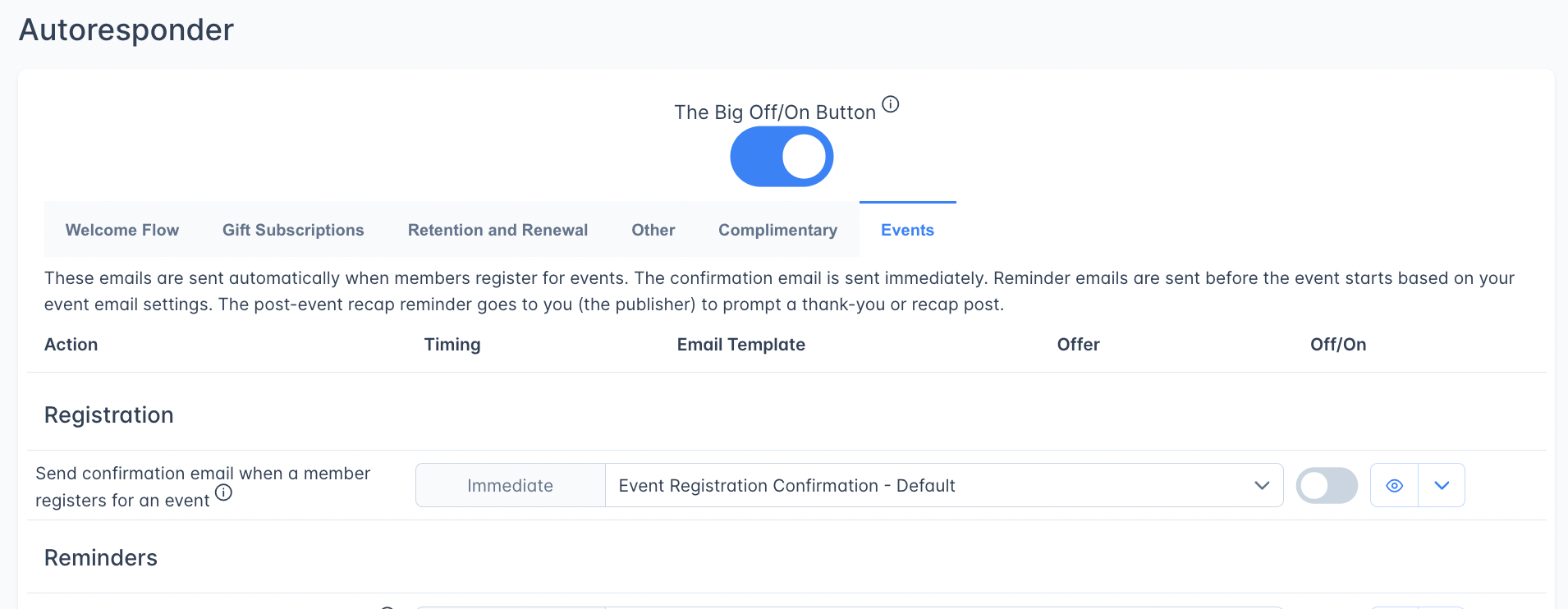 | Action | Timing | Recipient |
| ------------------------------------------------------ | --------------------------------------- | ------------------ |
| Send confirmation when a member registers for an event | Immediate | Registrant |
| Send first pre-event reminder | Configurable (default: 24 hours before) | Registered members |
| Send second pre-event reminder | Configurable (default: 2 hours before) | Registered members |
| Notify registrants when event details change | Immediate | Registered members |
| Notify registrants when an event is cancelled | Immediate | Registered members |
| Send post-event recap to publisher | After event ends | Staff/publisher |
Event confirmation emails are transactional and send regardless of a member's email opt-out setting. Reminder emails respect the member's preferences.
***
## Complimentary tab
7 actions for managing complimentary (free gifted) subscriptions.
| Action | Timing | Recipient |
| ------------------------------------------------------ | --------------------------------------- | ------------------ |
| Send confirmation when a member registers for an event | Immediate | Registrant |
| Send first pre-event reminder | Configurable (default: 24 hours before) | Registered members |
| Send second pre-event reminder | Configurable (default: 2 hours before) | Registered members |
| Notify registrants when event details change | Immediate | Registered members |
| Notify registrants when an event is cancelled | Immediate | Registered members |
| Send post-event recap to publisher | After event ends | Staff/publisher |
Event confirmation emails are transactional and send regardless of a member's email opt-out setting. Reminder emails respect the member's preferences.
***
## Complimentary tab
7 actions for managing complimentary (free gifted) subscriptions.
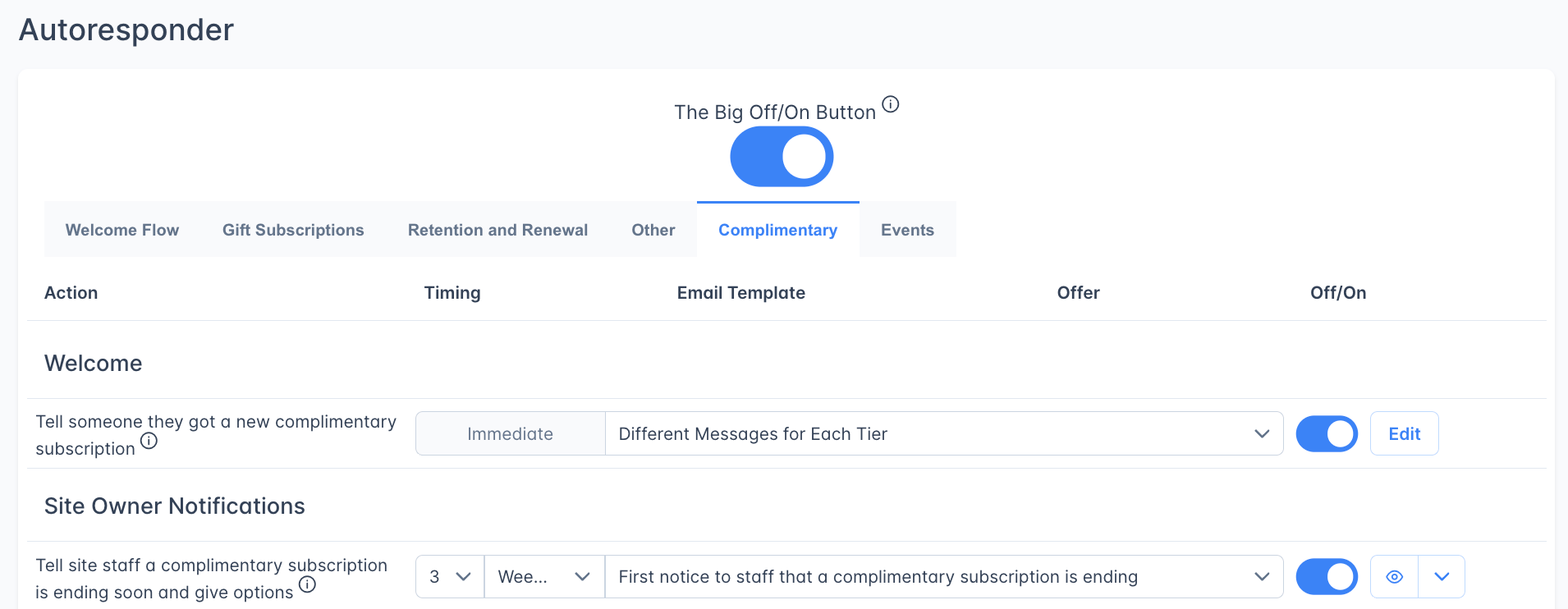 #### Welcome (1 action)
| Action | Timing |
| ------------------------------------------------------- | --------- |
| Tell someone they received a complimentary subscription | Immediate |
#### Site Owner Notifications (2 actions)
| # | Action | Default Timing |
| - | ------------------------------------------------------------------ | -------------- |
| 1 | Notify site staff that a complimentary subscription is ending soon | 3 Weeks |
| 2 | Second reminder to site staff | 2 Weeks |
These emails go to your staff, not to the subscriber, so you can decide whether to extend or let the comp expire.
#### Expiring Subscription Upsell (3 actions)
| # | Action | Default Timing |
| - | --------------------------------------------------------------------------- | -------------- |
| 1 | First warning to comp subscriber encouraging them to become a paying member | 10 Days |
| 2 | Second warning | 3 Days |
| 3 | Third and final warning | 1 Day |
#### Renewed Complimentary Notification (1 action)
| Action | Timing |
| ---------------------------------------------------------------------------- | --------- |
| Tell a comp subscriber that their subscription was extended for another year | Immediate |
***
## Frequently asked questions
The **Basic Autoresponder** (this page) contains 66 pre-built email actions organized by category. They're ready to use out of the box — just customize the templates and offers. The [Advanced Autoresponder](/features/advanced-autoresponder) lets you create custom multi-step flows with flexible triggers, audience targeting, and stop conditions for scenarios the pre-built actions don't cover.
No. Turning off the master toggle stops emails for that autoresponder from being sent. Emails already delivered are unaffected, but pending emails won't send until you turn it back on. The Basic and Advanced Autoresponders have separate toggles — turning off one doesn't affect the other.
Yes. Every pre-built action uses an email template you can fully customize. Click the pencil icon next to the template name to edit it, or select a different template from the dropdown. The eye icon previews the email.
Some actions (like the paid welcome email) let you send different content depending on which tier the subscriber chose. Click **Edit** to configure a unique template for each tier.
Auto-Spaced lets one flow handle trials of different lengths. Instead of a fixed delay, Outpost spaces the reminders evenly across the trial window — three reminders on a 7-day trial land every \~2 days; on a 14-day trial they land every 4–5 days. See [About Auto-Spaced timing](#about-auto-spaced-timing) for the full explanation.
The Nudge action detects when a member clicks an offer link but doesn't complete checkout. After a configurable delay (default: 1 hour), it sends a follow-up email containing the same offer.
Many Action Items show inline stats: emails sent, open rate, click rate, conversion rate, and revenue. The Failed Payment Flow has a dedicated statistics panel showing total save rate and revenue recovered.
***
## Related features
Create custom multi-step email flows with flexible triggers and audience targeting.
Automated dunning sequence for failed subscription renewals.
Create and customize the templates used by autoresponder actions
Create the discount offers used in retention and upsell emails
Event emails (confirmations, reminders, updates, cancellations) are managed here
#### Welcome (1 action)
| Action | Timing |
| ------------------------------------------------------- | --------- |
| Tell someone they received a complimentary subscription | Immediate |
#### Site Owner Notifications (2 actions)
| # | Action | Default Timing |
| - | ------------------------------------------------------------------ | -------------- |
| 1 | Notify site staff that a complimentary subscription is ending soon | 3 Weeks |
| 2 | Second reminder to site staff | 2 Weeks |
These emails go to your staff, not to the subscriber, so you can decide whether to extend or let the comp expire.
#### Expiring Subscription Upsell (3 actions)
| # | Action | Default Timing |
| - | --------------------------------------------------------------------------- | -------------- |
| 1 | First warning to comp subscriber encouraging them to become a paying member | 10 Days |
| 2 | Second warning | 3 Days |
| 3 | Third and final warning | 1 Day |
#### Renewed Complimentary Notification (1 action)
| Action | Timing |
| ---------------------------------------------------------------------------- | --------- |
| Tell a comp subscriber that their subscription was extended for another year | Immediate |
***
## Frequently asked questions
The **Basic Autoresponder** (this page) contains 66 pre-built email actions organized by category. They're ready to use out of the box — just customize the templates and offers. The [Advanced Autoresponder](/features/advanced-autoresponder) lets you create custom multi-step flows with flexible triggers, audience targeting, and stop conditions for scenarios the pre-built actions don't cover.
No. Turning off the master toggle stops emails for that autoresponder from being sent. Emails already delivered are unaffected, but pending emails won't send until you turn it back on. The Basic and Advanced Autoresponders have separate toggles — turning off one doesn't affect the other.
Yes. Every pre-built action uses an email template you can fully customize. Click the pencil icon next to the template name to edit it, or select a different template from the dropdown. The eye icon previews the email.
Some actions (like the paid welcome email) let you send different content depending on which tier the subscriber chose. Click **Edit** to configure a unique template for each tier.
Auto-Spaced lets one flow handle trials of different lengths. Instead of a fixed delay, Outpost spaces the reminders evenly across the trial window — three reminders on a 7-day trial land every \~2 days; on a 14-day trial they land every 4–5 days. See [About Auto-Spaced timing](#about-auto-spaced-timing) for the full explanation.
The Nudge action detects when a member clicks an offer link but doesn't complete checkout. After a configurable delay (default: 1 hour), it sends a follow-up email containing the same offer.
Many Action Items show inline stats: emails sent, open rate, click rate, conversion rate, and revenue. The Failed Payment Flow has a dedicated statistics panel showing total save rate and revenue recovered.
***
## Related features
Create custom multi-step email flows with flexible triggers and audience targeting.
Automated dunning sequence for failed subscription renewals.
Create and customize the templates used by autoresponder actions
Create the discount offers used in retention and upsell emails
Event emails (confirmations, reminders, updates, cancellations) are managed here