> ## Documentation Index
> Fetch the complete documentation index at: https://documentation.outpost.pub/llms.txt
> Use this file to discover all available pages before exploring further.
# Email Campaigns
> Send targeted one-time emails to member segments with scheduling, offer tracking, and open/click analytics.
Email campaigns are scheduled or immediate email sends to a targeted segment of your members. Unlike [autoresponder flows](/features/basic-autoresponder) (ongoing automations triggered by events), campaigns are discrete sends: anniversary sales, free-to-paid pushes, holiday promotions, fundraising appeals.
Unlike a Ghost newsletter send, campaigns have a separate marketing opt-out, so members can opt out of marketing without unsubscribing from your main list.
 New sites on the Space Station plan are limited to 20 emails a day. The limit lifts when you connect Stripe or upgrade your plan. Every email Outpost sends for your site counts toward it, including autoresponder and report emails, not just campaign sends.
On a site still under this limit, a large campaign takes several days to reach everyone. On a day when your site's other Outpost email has already used the allowance, the campaign sends nothing at all rather than a partial batch. It isn't marked Finished while recipients are still waiting. If you need the send to go out in one pass, connect Stripe first, or send to a small segment.
***
## Campaign list
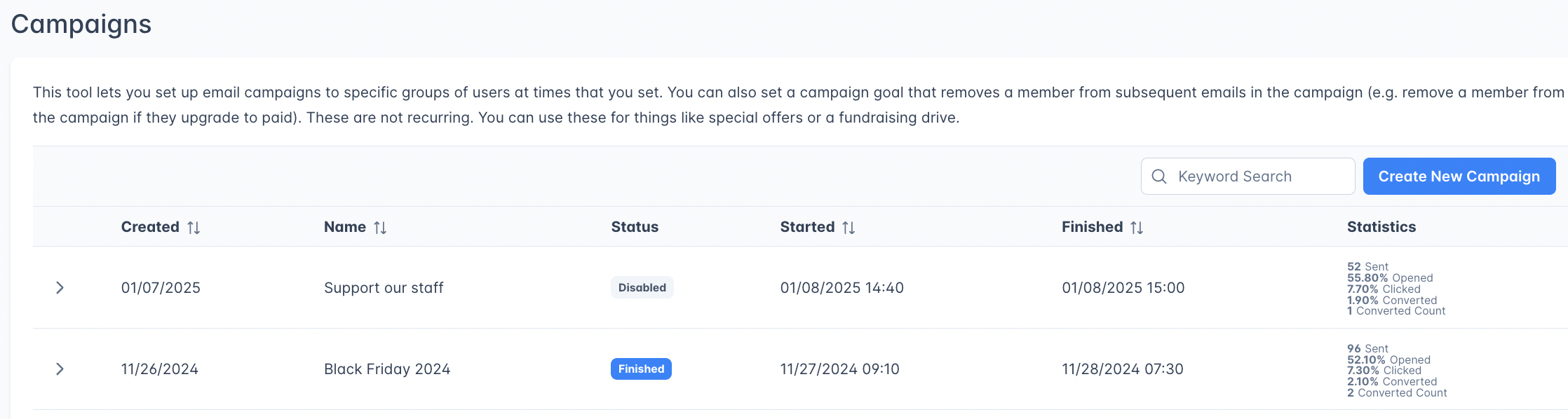
The Campaigns page displays all your campaigns, including active ones, scheduled ones and your past ones, in an expandable table:
| Column | Description |
| -------------- | ------------------------------------------------------------------------------------------------ |
| **Created** | When the campaign was created |
| **Name** | Internal campaign name |
| **Status** | Disabled, Waiting, In progress, Daily email limit, or Finished |
| **Started** | When the campaign began sending |
| **Finished** | When the campaign completed sending |
| **Statistics** | A combined cell showing sent count, open rate, click rate, conversion rate, and conversion count |
***
## Creating a campaign
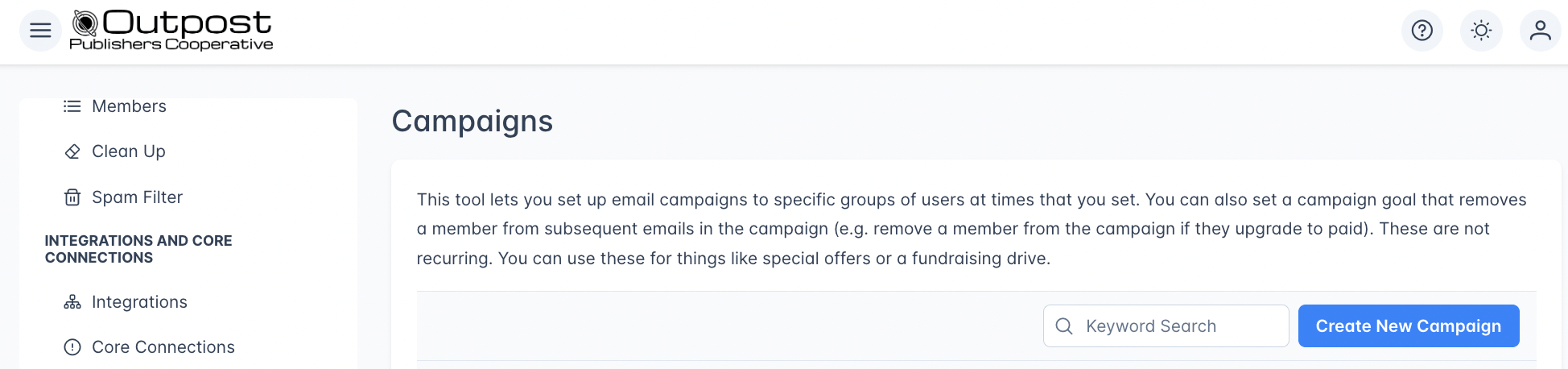
Go to **Campaigns** in the left navigation and click **Create New Campaign**.
New sites on the Space Station plan are limited to 20 emails a day. The limit lifts when you connect Stripe or upgrade your plan. Every email Outpost sends for your site counts toward it, including autoresponder and report emails, not just campaign sends.
On a site still under this limit, a large campaign takes several days to reach everyone. On a day when your site's other Outpost email has already used the allowance, the campaign sends nothing at all rather than a partial batch. It isn't marked Finished while recipients are still waiting. If you need the send to go out in one pass, connect Stripe first, or send to a small segment.
***
## Campaign list
The Campaigns page displays all your campaigns, including active ones, scheduled ones and your past ones, in an expandable table:
| Column | Description |
| -------------- | ------------------------------------------------------------------------------------------------ |
| **Created** | When the campaign was created |
| **Name** | Internal campaign name |
| **Status** | Disabled, Waiting, In progress, Daily email limit, or Finished |
| **Started** | When the campaign began sending |
| **Finished** | When the campaign completed sending |
| **Statistics** | A combined cell showing sent count, open rate, click rate, conversion rate, and conversion count |
***
## Creating a campaign
Go to **Campaigns** in the left navigation and click **Create New Campaign**.
 For your first campaign, we recommend testing with a small segment. Label a few staff members or trusted readers and send the campaign to that label only.
### Basic settings
| Field | Description |
| ------------------------------------ | ---------------------------------------------------------------------------------------------------------------------------------------------------------------------------------------------------------- |
| **Campaign Name (internal)** | Internal label for identifying the campaign. Members never see it. |
| **Slug** | Auto-generated from the name. Read-only after creation. |
| **Remove Member from Campaign When** | End condition: when a member should stop receiving campaign emails. Options: **No Condition** (send all emails regardless), **Member Renews**, **Member Upgrades to Paid**, **Member Downgrades to Free**. |
| **Is this a Marketing email?** | Toggle on to automatically exclude members with the `Marketing_OptOut` label (the legacy `Marketing_Optout` spelling and Shopify's `No_Marketing` label are honored too). |
### Audience targeting
| Field | Description |
| -------------------------------- | ------------------------------------------------------------------------------------------------------------------- |
| **Apply to** | Check one or more: Free, Paid, Complimentary, Group Subscriber, Institutional Subscriber. At least one is required. |
| **Tiers** | When Paid or Complimentary is selected, choose specific tiers to target. |
| **Only Include Members Labeled** | Only send to members who have one or more of these labels. |
| **Exclude Members Labeled** | Exclude members who have one or more of these labels. |
| **Members Count** | Shows the number of members matching your audience criteria. Click **Refresh Members Count** to recalculate. |
### Actions (email sends)
Each campaign has one or more actions, individual email sends at specific times:
| Field | Description |
| ------------------ | ----------------------------------------------------------------------------------- |
| **Send Time** | The date, time, and timezone for this email send. |
| **Email Template** | Select an existing [email template](/features/email-templates) or create a new one. |
| **Offer** | If the template includes an offer link, select the offer to apply. |
| **Enable/Disable** | Toggle individual actions on or off. |
Click **Add Action** to add additional sends to the campaign. Each action can use a different template and send at a different time.
For your first campaign, we recommend testing with a small segment. Label a few staff members or trusted readers and send the campaign to that label only.
### Basic settings
| Field | Description |
| ------------------------------------ | ---------------------------------------------------------------------------------------------------------------------------------------------------------------------------------------------------------- |
| **Campaign Name (internal)** | Internal label for identifying the campaign. Members never see it. |
| **Slug** | Auto-generated from the name. Read-only after creation. |
| **Remove Member from Campaign When** | End condition: when a member should stop receiving campaign emails. Options: **No Condition** (send all emails regardless), **Member Renews**, **Member Upgrades to Paid**, **Member Downgrades to Free**. |
| **Is this a Marketing email?** | Toggle on to automatically exclude members with the `Marketing_OptOut` label (the legacy `Marketing_Optout` spelling and Shopify's `No_Marketing` label are honored too). |
### Audience targeting
| Field | Description |
| -------------------------------- | ------------------------------------------------------------------------------------------------------------------- |
| **Apply to** | Check one or more: Free, Paid, Complimentary, Group Subscriber, Institutional Subscriber. At least one is required. |
| **Tiers** | When Paid or Complimentary is selected, choose specific tiers to target. |
| **Only Include Members Labeled** | Only send to members who have one or more of these labels. |
| **Exclude Members Labeled** | Exclude members who have one or more of these labels. |
| **Members Count** | Shows the number of members matching your audience criteria. Click **Refresh Members Count** to recalculate. |
### Actions (email sends)
Each campaign has one or more actions, individual email sends at specific times:
| Field | Description |
| ------------------ | ----------------------------------------------------------------------------------- |
| **Send Time** | The date, time, and timezone for this email send. |
| **Email Template** | Select an existing [email template](/features/email-templates) or create a new one. |
| **Offer** | If the template includes an offer link, select the offer to apply. |
| **Enable/Disable** | Toggle individual actions on or off. |
Click **Add Action** to add additional sends to the campaign. Each action can use a different template and send at a different time.
 Each template sends only once per member per campaign. If a member has already received a particular template in this campaign, they will not receive it again.
***
## Campaign status
| Status | Meaning |
| --------------------- | ---------------------------------------------------------------------------------------------------------------------------------------------------------------------------- |
| **Disabled** | Campaign is configured but not active. Emails won't send. |
| **Waiting** | Campaign is enabled and waiting for the scheduled send time. |
| **In progress** | Emails are currently being sent or the next Action is scheduled. |
| **Daily email limit** | The campaign has started, but your site's new-account daily email limit means some recipients are still waiting. It picks up again on days when the site has allowance left. |
| **Finished** | The campaign's send window has closed. This doesn't guarantee every targeted member was emailed. |
Use the **On/Off switch** at the top of the campaign editor to enable or disable the entire campaign.
Each template sends only once per member per campaign. If a member has already received a particular template in this campaign, they will not receive it again.
***
## Campaign status
| Status | Meaning |
| --------------------- | ---------------------------------------------------------------------------------------------------------------------------------------------------------------------------- |
| **Disabled** | Campaign is configured but not active. Emails won't send. |
| **Waiting** | Campaign is enabled and waiting for the scheduled send time. |
| **In progress** | Emails are currently being sent or the next Action is scheduled. |
| **Daily email limit** | The campaign has started, but your site's new-account daily email limit means some recipients are still waiting. It picks up again on days when the site has allowance left. |
| **Finished** | The campaign's send window has closed. This doesn't guarantee every targeted member was emailed. |
Use the **On/Off switch** at the top of the campaign editor to enable or disable the entire campaign.
 ***
## Statistics
After a campaign sends, Outpost tracks per-action statistics:
| Metric | Description |
| --------------- | ------------------------------------------------------------------------------------------------------------------------------------------------------------------ |
| **Sent** | Total recipients for this action |
| **Opened %** | Unique opens as a percentage of sent |
| **Clicked %** | Unique link clicks as a percentage of sent |
| **Converted %** | Members who took the desired action (e.g., subscribed via offer) |
| **Count** | Total conversion count |
| **Revenue** | Revenue attributed to conversions from this email. Shown as **Saved** for retention and cancellation campaigns, where it reflects the value of subscriptions kept. |
***
## Campaign vs. autoresponder flow
| | Campaign | Autoresponder Flow |
| -------------- | --------------------------------------------------------------------- | ------------------------------------------- |
| **Trigger** | Manual/scheduled | Event-based (signup, renewal, label change) |
| **Audience** | Determined at campaign start and ahead of each action in the campaign | Individual members as events occur |
| **Recurrence** | One-time sends | Ongoing automation |
| **Use case** | Announcements, special offers, fundraising | Welcome sequences, retention, dunning |
***
## Related features
Create the email content used in campaigns.
Set up ongoing automated email sequences.
Link offers to campaign emails for tracked conversions.
Configure global exclusions that apply to campaigns.
***
## FAQ
Yes. Click **Add Action** to add additional sends. Each action can use a different template and be scheduled for a different time, creating a multi-touch campaign.
When enabled, the campaign automatically excludes any member with the `Marketing_OptOut` label (or the legacy `Marketing_Optout` and Shopify `No_Marketing` labels). This helps comply with email marketing preferences.
No. Once a campaign reaches the Finished status, the editor is read-only. Create a new campaign if you want to re-send to a similar audience.
When a campaign starts, Outpost evaluates your targeting criteria and records the matching members. The audience is locked at that point: members who join or change status after the campaign starts are not included in subsequent actions of the same campaign.
Outpost's count is usually the smaller of the two, for three reasons.
* **Campaigns only count members who can currently receive email from you.** Anyone who has unsubscribed from your newsletters, or turned off promotional and event notification emails in their subscription settings, is left out. A label filter in Ghost does not apply that check, so Ghost still counts those members.
* **Opt-out labels are excluded as a family.** With the marketing email toggle on, the campaign's **Exclude Members Labeled** list shows `Marketing_OptOut`, but Outpost also holds back members carrying the legacy `Marketing_Optout` spelling and the Shopify `No_Marketing` label. Copying the visible filter into Ghost excludes only the first, so Ghost's count stays higher.
* **Labels applied through Ghost's bulk Add label and Remove label actions may not have reached Outpost yet.** Outpost catches up on its own within a few hours; see [labels](/features/labels) for how to bring the two in line right away.
If the gap looks larger than these account for, [refresh your site data](/integrations/ghost#manual-resync) and then click **Refresh Members Count**.
***
## Statistics
After a campaign sends, Outpost tracks per-action statistics:
| Metric | Description |
| --------------- | ------------------------------------------------------------------------------------------------------------------------------------------------------------------ |
| **Sent** | Total recipients for this action |
| **Opened %** | Unique opens as a percentage of sent |
| **Clicked %** | Unique link clicks as a percentage of sent |
| **Converted %** | Members who took the desired action (e.g., subscribed via offer) |
| **Count** | Total conversion count |
| **Revenue** | Revenue attributed to conversions from this email. Shown as **Saved** for retention and cancellation campaigns, where it reflects the value of subscriptions kept. |
***
## Campaign vs. autoresponder flow
| | Campaign | Autoresponder Flow |
| -------------- | --------------------------------------------------------------------- | ------------------------------------------- |
| **Trigger** | Manual/scheduled | Event-based (signup, renewal, label change) |
| **Audience** | Determined at campaign start and ahead of each action in the campaign | Individual members as events occur |
| **Recurrence** | One-time sends | Ongoing automation |
| **Use case** | Announcements, special offers, fundraising | Welcome sequences, retention, dunning |
***
## Related features
Create the email content used in campaigns.
Set up ongoing automated email sequences.
Link offers to campaign emails for tracked conversions.
Configure global exclusions that apply to campaigns.
***
## FAQ
Yes. Click **Add Action** to add additional sends. Each action can use a different template and be scheduled for a different time, creating a multi-touch campaign.
When enabled, the campaign automatically excludes any member with the `Marketing_OptOut` label (or the legacy `Marketing_Optout` and Shopify `No_Marketing` labels). This helps comply with email marketing preferences.
No. Once a campaign reaches the Finished status, the editor is read-only. Create a new campaign if you want to re-send to a similar audience.
When a campaign starts, Outpost evaluates your targeting criteria and records the matching members. The audience is locked at that point: members who join or change status after the campaign starts are not included in subsequent actions of the same campaign.
Outpost's count is usually the smaller of the two, for three reasons.
* **Campaigns only count members who can currently receive email from you.** Anyone who has unsubscribed from your newsletters, or turned off promotional and event notification emails in their subscription settings, is left out. A label filter in Ghost does not apply that check, so Ghost still counts those members.
* **Opt-out labels are excluded as a family.** With the marketing email toggle on, the campaign's **Exclude Members Labeled** list shows `Marketing_OptOut`, but Outpost also holds back members carrying the legacy `Marketing_Optout` spelling and the Shopify `No_Marketing` label. Copying the visible filter into Ghost excludes only the first, so Ghost's count stays higher.
* **Labels applied through Ghost's bulk Add label and Remove label actions may not have reached Outpost yet.** Outpost catches up on its own within a few hours; see [labels](/features/labels) for how to bring the two in line right away.
If the gap looks larger than these account for, [refresh your site data](/integrations/ghost#manual-resync) and then click **Refresh Members Count**.