> ## Documentation Index
> Fetch the complete documentation index at: https://documentation.outpost.pub/llms.txt
> Use this file to discover all available pages before exploring further.
# Email Design Settings
> Configure from address, header image, colors, fonts, and custom HTML templates for all Outpost emails.
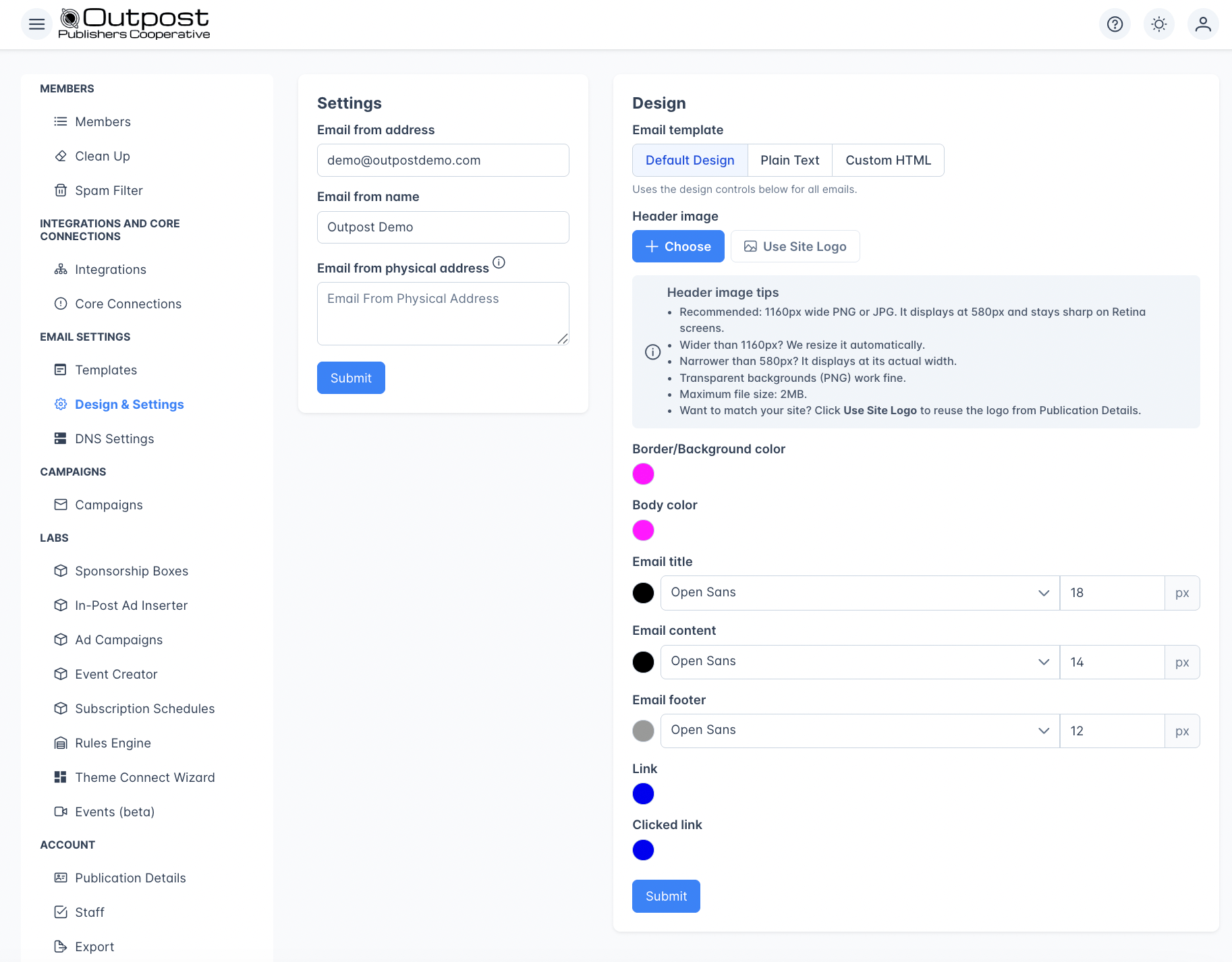
Email Design Settings control the appearance and sender identity for all emails sent through Outpost, including [autoresponder flows](/features/basic-autoresponder), [campaigns](/features/email-campaigns), and system notifications. This is where you set your from address, upload a header image, and customize colors and fonts to match your publication's branding.
 ***
## Sender identity
| Field | Description |
| ------------------------------- | -------------------------------------------------------------------------------------------------------------------------------------------- |
| **Email from address** | The email address recipients see in their inbox (e.g., `hello@yourpublication.com`). Required. Managed by Outpost. |
| **Email Reply-to Address** | The address used when a recipient replies to one of your emails. Set this if you want replies to land somewhere other than the from address. |
| **Email from name** | The sender name recipients see (e.g., "The Daily Brief"). Required. |
| **Email from physical address** | Optional physical mailing address included in the email footer for CAN-SPAM compliance. |
For the best sender reputation, use an address on your [Autoresponder Sending Domain](/features/autoresponder-sending-domain) rather than the default Outpost domain.
***
## Design options
Your emails use one of three **Email template** modes, chosen with the selector at the top of Email Design Settings:
* **Default Design**: Outpost's standard email layout, styled with the header image, colors, fonts, and button options below.
* **Plain Text**: strips all styling for a plain-text email (see [Plain text mode](#plain-text-mode)).
* **Custom HTML**: your own HTML wrapper (see [Custom HTML template](#custom-html-template)).
The design controls in this section (header image, colors, fonts, and buttons) apply when you're using **Default Design**.
### Header image
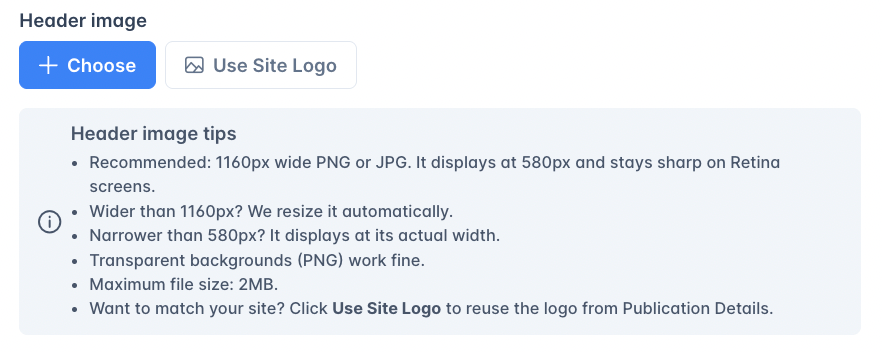
Upload a logo or banner image that appears at the top of every email. The header image is the only image field in Email Design Settings. It renders centered at the top of every email Outpost sends. If you've already set a logo in [Publication Details](/features/publication-details), click **Use Site Logo** to reuse it. Click **Remove** to go back to a text-only header.
Uploading a header image saves your email settings automatically: there's no separate Submit step, and removing the image saves automatically too. (**Use Site Logo** stages the change, so click **Submit** to keep it.)
***
## Sender identity
| Field | Description |
| ------------------------------- | -------------------------------------------------------------------------------------------------------------------------------------------- |
| **Email from address** | The email address recipients see in their inbox (e.g., `hello@yourpublication.com`). Required. Managed by Outpost. |
| **Email Reply-to Address** | The address used when a recipient replies to one of your emails. Set this if you want replies to land somewhere other than the from address. |
| **Email from name** | The sender name recipients see (e.g., "The Daily Brief"). Required. |
| **Email from physical address** | Optional physical mailing address included in the email footer for CAN-SPAM compliance. |
For the best sender reputation, use an address on your [Autoresponder Sending Domain](/features/autoresponder-sending-domain) rather than the default Outpost domain.
***
## Design options
Your emails use one of three **Email template** modes, chosen with the selector at the top of Email Design Settings:
* **Default Design**: Outpost's standard email layout, styled with the header image, colors, fonts, and button options below.
* **Plain Text**: strips all styling for a plain-text email (see [Plain text mode](#plain-text-mode)).
* **Custom HTML**: your own HTML wrapper (see [Custom HTML template](#custom-html-template)).
The design controls in this section (header image, colors, fonts, and buttons) apply when you're using **Default Design**.
### Header image
Upload a logo or banner image that appears at the top of every email. The header image is the only image field in Email Design Settings. It renders centered at the top of every email Outpost sends. If you've already set a logo in [Publication Details](/features/publication-details), click **Use Site Logo** to reuse it. Click **Remove** to go back to a text-only header.
Uploading a header image saves your email settings automatically: there's no separate Submit step, and removing the image saves automatically too. (**Use Site Logo** stages the change, so click **Submit** to keep it.)
 #### Suggested sizes
| What you're optimizing for | Recommended source size | Why |
| ---------------------------------------------- | ----------------------------------- | --------------------------------------------------------------------------------------------------------------------- |
| **Standard display** | 580px wide | The header renders at up to 580px wide in most email clients. |
| **Retina / high-DPI display**\*(recommended)\* | **1160px wide** | Sharp rendering on retina displays (2× the display width). This is the size Outpost recommends for most publications. |
| Wider source files | Anything up to your file-size limit | Outpost automatically resizes them down to 1160px wide on upload. |
* **File format:** PNG, JPG, GIF, or WebP
* **Max file size:** 2 MB (enforced by the upload control)
* **Aspect ratio:** Anything works. Outpost preserves your aspect ratio when resizing
* **Height:** No fixed limit, but tall headers push content below the fold; most publications keep their header under \~200px tall
#### Auto-resize on upload
Outpost automatically resizes oversized header images on upload:
* Images **wider than 1160px** are scaled down to 1160px wide.
* The original aspect ratio is preserved. Outpost does **not** crop.
* Images at or under 1160px wide are stored as-is.
You can drop in a high-resolution logo straight from your design tool without exporting a smaller version first. The resized image is what gets stored and embedded in every email.
For the crispest header, upload at exactly 1160px wide. Outpost serves that size to all clients and email apps display it at 580px on standard screens or full size on retina screens, covering both cases without scaling artifacts.
### Plain text mode
Switching the Email template to **Plain Text** strips all styling from your emails. They're sent as plain text without colors (including link colors), fonts, the header image, or button styling. This can improve deliverability for some audiences. Switch back to **Default Design** to restore the styled layout and the options below.
### Colors
| Setting | Description |
| --------------------------- | ---------------------------------------------------------------- |
| **Border/Background color** | The outer border and background color of the email wrapper. |
| **Body color** | The background color of the email content area. |
| **Link color** | The color applied to links (`` tags) in the email body. |
| **Clicked link color** | The color applied to active, visited, and hover states of links. |
### Fonts and text
| Setting | Description |
| ---------------------------- | ---------------------------------------------------------------------------------------------------------------------------------------------------------------------------- |
| **Email title and headings** | Font family (default: Open Sans) and color for the headings in your email body. Heading sizes are fixed for each heading level, so the size field on this row has no effect. |
| **Email content** | Font family (default: Open Sans), size (default: 14px), and color for body text. |
| **Email footer** | Font family (default: Open Sans), size (default: 12px), and color for footer text. |
### Buttons
Style the call-to-action buttons in your Default Design emails:
| Setting | Description |
| --------------------- | ---------------------------------------------------------------------------------------- |
| **Button background** | The button's fill color (default: `#15171a`). |
| **Button text color** | The color of the button label (default: `#ffffff`). |
| **Button radius** | The corner style: **Fully rounded** (pill-shaped) or **Slightly rounded** (the default). |
These styles apply to the buttons Outpost adds to Default Design emails. They don't affect Plain Text emails (which carry no styling) or Custom HTML templates, where you control button styling yourself.
***
## Custom HTML template
For full control over your email layout, set the Email template to **Custom HTML**. This lets you write raw HTML that wraps your email content.
This is an advanced, developer-level feature, and you own all email-client compatibility and debugging yourself. Before you start, read the [Custom HTML Email Template Guide](/features/custom-html-email-template), which covers how rendering works, the client quirks, and how to test.
### Available merge tags
| Tag | Description |
| --------------------------------------- | --------------------------------------------------- |
| `%CURRENT_DATE%` | Today's date |
| `%BODY%` | The email body content (from the template) |
| `%SITE_PATH%` / `%BLOG_PATH%` | Your site's base path |
| `%SITE_NAME%` / `%BLOG_NAME%` | Your publication name |
| `%SITE_URL%` / `%BLOG_URL%` | Your publication URL |
| `%SITE_LOGIN_URL%` / `%BLOG_LOGIN_URL%` | Your publication's sign-in page URL |
| `%ACCOUNT_LINK%` | Member's account page URL |
| `%EMAIL_FROM_NAME%` | The sender name configured in Email Design Settings |
| `%EMAIL_HEADER_IMAGE%` | The header image URL |
| `%SUBSCRIPTION_EXPIRATION_DATE%` | Member's subscription expiration date |
| `%RECIPIENT.PAID_BLOCK_START%` | Start of paid-member-only content block |
| `%RECIPIENT.PAID_BLOCK_END%` | End of paid-member-only content block |
| `%RECIPIENT.FREE_BLOCK_START%` | Start of free-member-only content block |
| `%RECIPIENT.FREE_BLOCK_END%` | End of free-member-only content block |
| `%UNSUBSCRIBE_URL%` | Member's unsubscribe link |
The `%BLOG_*%` and `%SITE_*%` prefixes are interchangeable. For example, `%BLOG_NAME%` and `%SITE_NAME%` produce the same output. Use whichever you prefer.
### Preview
Use the **Preview** tab to see how your custom HTML renders. Toggle between **Free Member** and **Paid Member** views to verify conditional content blocks display correctly.
***
## Related features
Create the email content that uses these design settings.
Send from your own domain for better deliverability.
Mailgun delivers all emails styled with these settings.
***
## FAQ
Yes. Colors, fonts, header image, and custom HTML affect all emails sent through Outpost: autoresponder flows, campaigns, and system notifications.
Yes. In Email Design Settings, under **Default Design**, the **Buttons** section lets you set the button background color, the button text color, and the corner radius (fully rounded or slightly rounded). These apply to the buttons in Default Design emails. Plain Text emails carry no styling, and Custom HTML templates use whatever button styling you write yourself.
Yes. In your custom HTML template, use `%RECIPIENT.PAID_BLOCK_START%` and `%RECIPIENT.PAID_BLOCK_END%` to wrap content visible only to paid members. Use the free equivalents (`%RECIPIENT.FREE_BLOCK_START%` / `%RECIPIENT.FREE_BLOCK_END%`) for free-member-only content. The preview tab lets you toggle between views.
All styling is stripped: no colors, fonts, header image, or button styling. Emails are sent as plain text. This can be useful for audiences where plain text performs better (e.g., business/enterprise).
Upload at **1160px wide**. The header renders at up to 580px in most email clients, so 1160px gives you sharp display on retina screens (which render at 2× density). Outpost auto-resizes anything wider than 1160px down to 1160px on upload. Your aspect ratio is preserved. Max file size is 2 MB.
No. Outpost only **scales down** images wider than 1160px, preserving the full aspect ratio. Nothing gets cut off. If you want to reframe the image, edit it before uploading.
The header image is the only image you can configure in Email Design Settings. To add more imagery (hero images, signature images, social icons, etc.), use the **Custom HTML Template** to embed `
#### Suggested sizes
| What you're optimizing for | Recommended source size | Why |
| ---------------------------------------------- | ----------------------------------- | --------------------------------------------------------------------------------------------------------------------- |
| **Standard display** | 580px wide | The header renders at up to 580px wide in most email clients. |
| **Retina / high-DPI display**\*(recommended)\* | **1160px wide** | Sharp rendering on retina displays (2× the display width). This is the size Outpost recommends for most publications. |
| Wider source files | Anything up to your file-size limit | Outpost automatically resizes them down to 1160px wide on upload. |
* **File format:** PNG, JPG, GIF, or WebP
* **Max file size:** 2 MB (enforced by the upload control)
* **Aspect ratio:** Anything works. Outpost preserves your aspect ratio when resizing
* **Height:** No fixed limit, but tall headers push content below the fold; most publications keep their header under \~200px tall
#### Auto-resize on upload
Outpost automatically resizes oversized header images on upload:
* Images **wider than 1160px** are scaled down to 1160px wide.
* The original aspect ratio is preserved. Outpost does **not** crop.
* Images at or under 1160px wide are stored as-is.
You can drop in a high-resolution logo straight from your design tool without exporting a smaller version first. The resized image is what gets stored and embedded in every email.
For the crispest header, upload at exactly 1160px wide. Outpost serves that size to all clients and email apps display it at 580px on standard screens or full size on retina screens, covering both cases without scaling artifacts.
### Plain text mode
Switching the Email template to **Plain Text** strips all styling from your emails. They're sent as plain text without colors (including link colors), fonts, the header image, or button styling. This can improve deliverability for some audiences. Switch back to **Default Design** to restore the styled layout and the options below.
### Colors
| Setting | Description |
| --------------------------- | ---------------------------------------------------------------- |
| **Border/Background color** | The outer border and background color of the email wrapper. |
| **Body color** | The background color of the email content area. |
| **Link color** | The color applied to links (`` tags) in the email body. |
| **Clicked link color** | The color applied to active, visited, and hover states of links. |
### Fonts and text
| Setting | Description |
| ---------------------------- | ---------------------------------------------------------------------------------------------------------------------------------------------------------------------------- |
| **Email title and headings** | Font family (default: Open Sans) and color for the headings in your email body. Heading sizes are fixed for each heading level, so the size field on this row has no effect. |
| **Email content** | Font family (default: Open Sans), size (default: 14px), and color for body text. |
| **Email footer** | Font family (default: Open Sans), size (default: 12px), and color for footer text. |
### Buttons
Style the call-to-action buttons in your Default Design emails:
| Setting | Description |
| --------------------- | ---------------------------------------------------------------------------------------- |
| **Button background** | The button's fill color (default: `#15171a`). |
| **Button text color** | The color of the button label (default: `#ffffff`). |
| **Button radius** | The corner style: **Fully rounded** (pill-shaped) or **Slightly rounded** (the default). |
These styles apply to the buttons Outpost adds to Default Design emails. They don't affect Plain Text emails (which carry no styling) or Custom HTML templates, where you control button styling yourself.
***
## Custom HTML template
For full control over your email layout, set the Email template to **Custom HTML**. This lets you write raw HTML that wraps your email content.
This is an advanced, developer-level feature, and you own all email-client compatibility and debugging yourself. Before you start, read the [Custom HTML Email Template Guide](/features/custom-html-email-template), which covers how rendering works, the client quirks, and how to test.
### Available merge tags
| Tag | Description |
| --------------------------------------- | --------------------------------------------------- |
| `%CURRENT_DATE%` | Today's date |
| `%BODY%` | The email body content (from the template) |
| `%SITE_PATH%` / `%BLOG_PATH%` | Your site's base path |
| `%SITE_NAME%` / `%BLOG_NAME%` | Your publication name |
| `%SITE_URL%` / `%BLOG_URL%` | Your publication URL |
| `%SITE_LOGIN_URL%` / `%BLOG_LOGIN_URL%` | Your publication's sign-in page URL |
| `%ACCOUNT_LINK%` | Member's account page URL |
| `%EMAIL_FROM_NAME%` | The sender name configured in Email Design Settings |
| `%EMAIL_HEADER_IMAGE%` | The header image URL |
| `%SUBSCRIPTION_EXPIRATION_DATE%` | Member's subscription expiration date |
| `%RECIPIENT.PAID_BLOCK_START%` | Start of paid-member-only content block |
| `%RECIPIENT.PAID_BLOCK_END%` | End of paid-member-only content block |
| `%RECIPIENT.FREE_BLOCK_START%` | Start of free-member-only content block |
| `%RECIPIENT.FREE_BLOCK_END%` | End of free-member-only content block |
| `%UNSUBSCRIBE_URL%` | Member's unsubscribe link |
The `%BLOG_*%` and `%SITE_*%` prefixes are interchangeable. For example, `%BLOG_NAME%` and `%SITE_NAME%` produce the same output. Use whichever you prefer.
### Preview
Use the **Preview** tab to see how your custom HTML renders. Toggle between **Free Member** and **Paid Member** views to verify conditional content blocks display correctly.
***
## Related features
Create the email content that uses these design settings.
Send from your own domain for better deliverability.
Mailgun delivers all emails styled with these settings.
***
## FAQ
Yes. Colors, fonts, header image, and custom HTML affect all emails sent through Outpost: autoresponder flows, campaigns, and system notifications.
Yes. In Email Design Settings, under **Default Design**, the **Buttons** section lets you set the button background color, the button text color, and the corner radius (fully rounded or slightly rounded). These apply to the buttons in Default Design emails. Plain Text emails carry no styling, and Custom HTML templates use whatever button styling you write yourself.
Yes. In your custom HTML template, use `%RECIPIENT.PAID_BLOCK_START%` and `%RECIPIENT.PAID_BLOCK_END%` to wrap content visible only to paid members. Use the free equivalents (`%RECIPIENT.FREE_BLOCK_START%` / `%RECIPIENT.FREE_BLOCK_END%`) for free-member-only content. The preview tab lets you toggle between views.
All styling is stripped: no colors, fonts, header image, or button styling. Emails are sent as plain text. This can be useful for audiences where plain text performs better (e.g., business/enterprise).
Upload at **1160px wide**. The header renders at up to 580px in most email clients, so 1160px gives you sharp display on retina screens (which render at 2× density). Outpost auto-resizes anything wider than 1160px down to 1160px on upload. Your aspect ratio is preserved. Max file size is 2 MB.
No. Outpost only **scales down** images wider than 1160px, preserving the full aspect ratio. Nothing gets cut off. If you want to reframe the image, edit it before uploading.
The header image is the only image you can configure in Email Design Settings. To add more imagery (hero images, signature images, social icons, etc.), use the **Custom HTML Template** to embed `![]() ` tags pointing to your own hosted images, or include images inside individual [email templates](/features/email-templates) where they're part of the email body.
` tags pointing to your own hosted images, or include images inside individual [email templates](/features/email-templates) where they're part of the email body.