> ## Documentation Index
> Fetch the complete documentation index at: https://documentation.outpost.pub/llms.txt
> Use this file to discover all available pages before exploring further.
# Gated Downloads
> Offer downloadable PDFs, ebooks, and files on your Ghost site that require a free signup or paid subscription to access.
Gated Downloads let you offer downloadable files (reports, guides, ebooks, templates) to anyone, exclusively to free and paid members, or only to paid members. For the Free and Paid access levels, visitors must sign up or upgrade before they can access the file, so Gated Downloads work as both a lead-generation tool and a paid-subscriber benefit.
You can embed these in any post, even one available to everyone, and the protections still work.
 ## How it works
1. You upload a PDF or ePub file
2. You choose the access and delivery requirements in Outpost
3. You choose what these look like, including a Card version
4. Outpost generates an embed code you paste into a Ghost post or page
5. Readers see a download button (if qualified) or a subscribe/upgrade prompt
6. On download for qualified users, Outpost lets them view the file immediately, get it emailed to them as an attachment or link, or both.
7. Outpost tracks signups, upgrades, and downloads per file
## Setting up a Gated Download
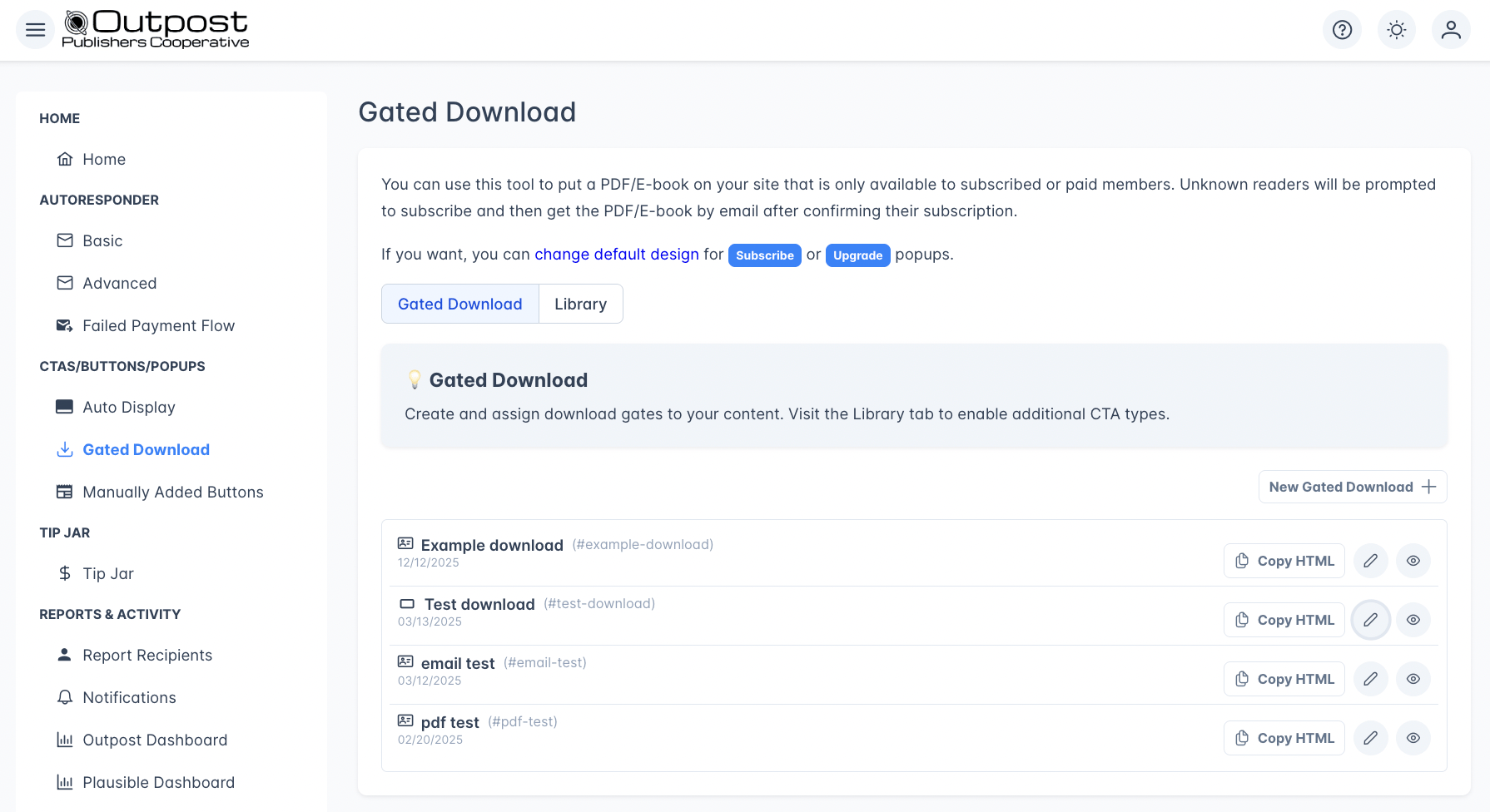
Go to **CTAs/Buttons/Popups → Gated Download** and click **New Gated Download +**.
## How it works
1. You upload a PDF or ePub file
2. You choose the access and delivery requirements in Outpost
3. You choose what these look like, including a Card version
4. Outpost generates an embed code you paste into a Ghost post or page
5. Readers see a download button (if qualified) or a subscribe/upgrade prompt
6. On download for qualified users, Outpost lets them view the file immediately, get it emailed to them as an attachment or link, or both.
7. Outpost tracks signups, upgrades, and downloads per file
## Setting up a Gated Download
Go to **CTAs/Buttons/Popups → Gated Download** and click **New Gated Download +**.
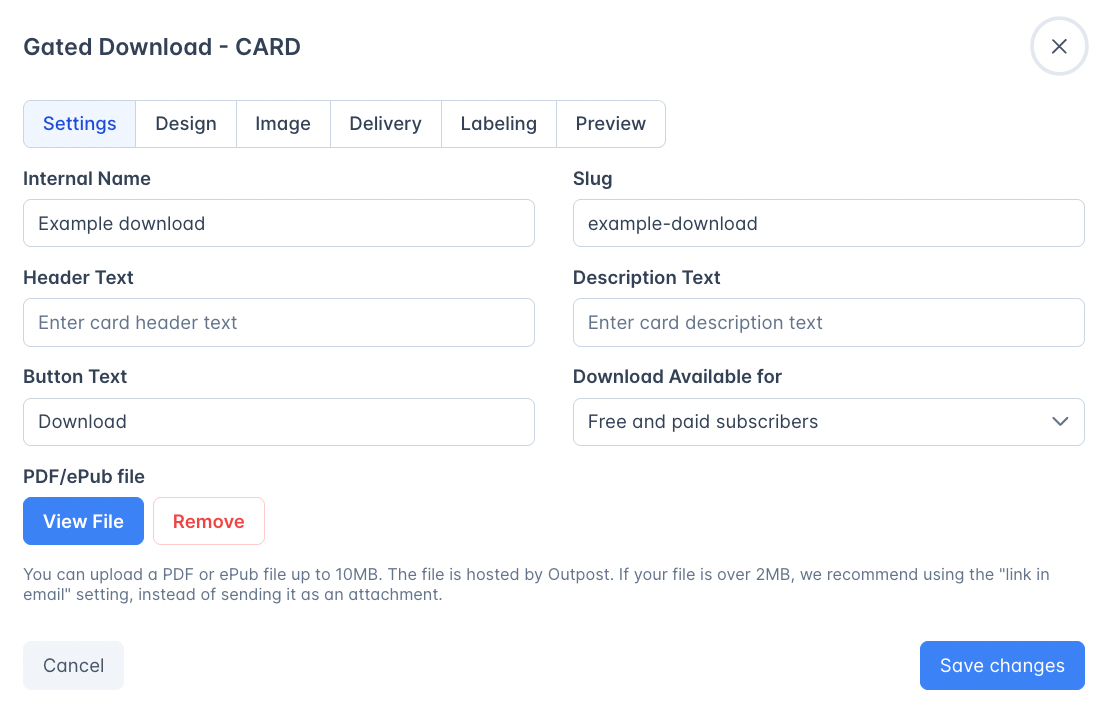
 Every gated download editor has a **Name** field above the tab switcher, the same as the CTA editor. It's for your own reference, never shown to readers, but changing it also updates the **Slug** on the Settings tab below, which is part of the live download link.
Closing the editor with unsaved changes now asks first, whichever way you leave: the header X, the Cancel button, or navigating elsewhere in Outpost. Choose **Save and close** to save and exit, **Discard changes** to put the gated download back the way it was last saved, or **Keep editing** to stay.
### Settings tab
Every gated download editor has a **Name** field above the tab switcher, the same as the CTA editor. It's for your own reference, never shown to readers, but changing it also updates the **Slug** on the Settings tab below, which is part of the live download link.
Closing the editor with unsaved changes now asks first, whichever way you leave: the header X, the Cancel button, or navigating elsewhere in Outpost. Choose **Save and close** to save and exit, **Discard changes** to put the gated download back the way it was last saved, or **Keep editing** to stay.
### Settings tab
 | Field | Description |
| -------------------------------------- | --------------------------------------------------------------------------------------------------------------------------------------------------- |
| **Slug** | Set from the Name field above, and used in the download link. Unique per site: renaming the download changes this, and changes the link. |
| **Header Text** / **Description Text** | Headline and supporting text shown on Card and Box display styles |
| **Button Text** | The button label readers see (e.g., "Download the 2025 Trends Report") |
| **Download Available for** | Who can download (see below) |
| **PDF/ePub file** | Upload your PDF or ePub file, up to 10 MB. If the file is over 2 MB, use the "Send Link to File in Email" delivery method instead of an attachment. |
The **display style** (Button, Card, or Box) is chosen when you create the download from the "Select base model" dialog and shown as an icon on the download list.
### Access levels
| Label | Stored value | Who can download |
| ----------------------------- | ------------ | --------------------------------------------------------------------------------------------------------------------------------------------------------------------------------------------------------------------- |
| **Everyone** | `all` | Anyone: no login required (not truly "gated") |
| **Free and paid subscribers** | `free` | Free members and above, which requires at least a free signup for an unknown member |
| **Only paid members** | `paid` | Paid and complimentary members. This requires an active paid subscription. Complimentary members (including group subscribers, institutional subscribers, and members on passes) are treated as paid and have access. |
### Delivery tab
Configure what happens after a reader subscribes to access the file:
| Field | Description |
| -------------------------------------- | --------------------------------------------------------------------------------------------------------------------------------------------------- |
| **Slug** | Set from the Name field above, and used in the download link. Unique per site: renaming the download changes this, and changes the link. |
| **Header Text** / **Description Text** | Headline and supporting text shown on Card and Box display styles |
| **Button Text** | The button label readers see (e.g., "Download the 2025 Trends Report") |
| **Download Available for** | Who can download (see below) |
| **PDF/ePub file** | Upload your PDF or ePub file, up to 10 MB. If the file is over 2 MB, use the "Send Link to File in Email" delivery method instead of an attachment. |
The **display style** (Button, Card, or Box) is chosen when you create the download from the "Select base model" dialog and shown as an icon on the download list.
### Access levels
| Label | Stored value | Who can download |
| ----------------------------- | ------------ | --------------------------------------------------------------------------------------------------------------------------------------------------------------------------------------------------------------------- |
| **Everyone** | `all` | Anyone: no login required (not truly "gated") |
| **Free and paid subscribers** | `free` | Free members and above, which requires at least a free signup for an unknown member |
| **Only paid members** | `paid` | Paid and complimentary members. This requires an active paid subscription. Complimentary members (including group subscribers, institutional subscribers, and members on passes) are treated as paid and have access. |
### Delivery tab
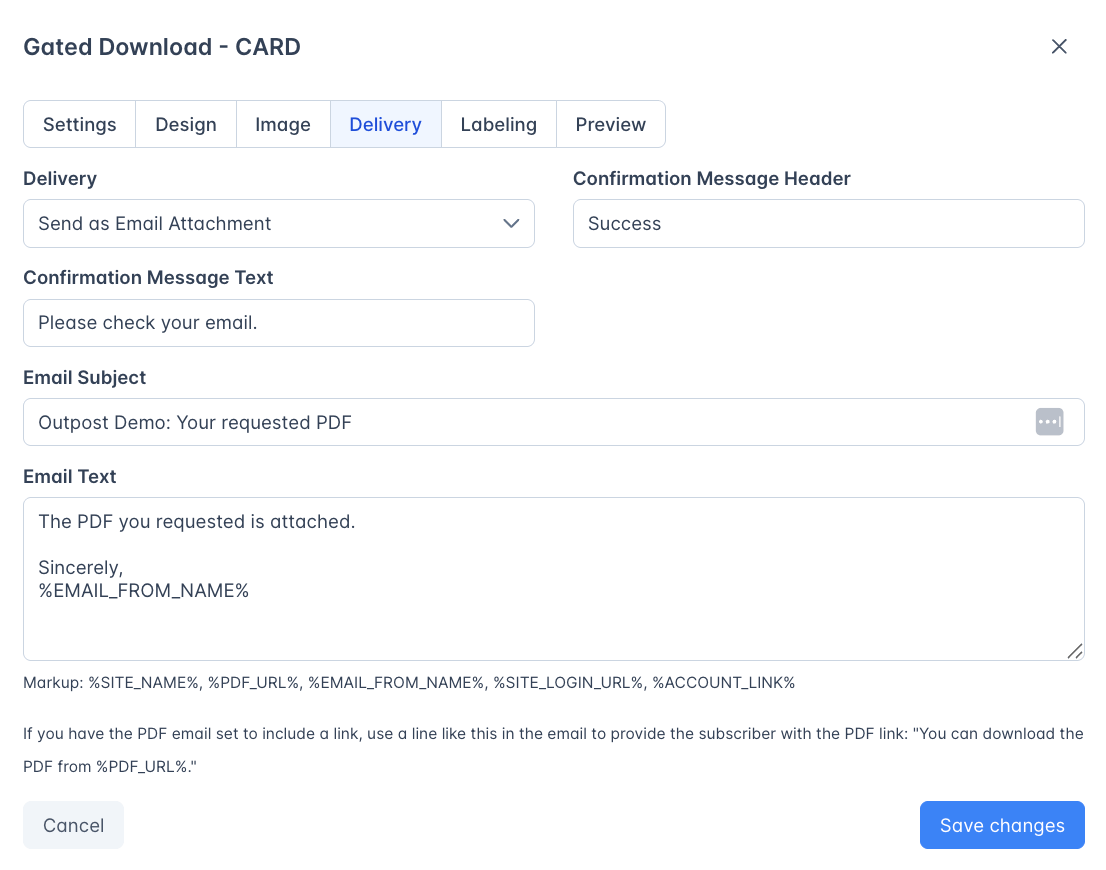
Configure what happens after a reader subscribes to access the file:
 | Field | Description |
| ------------------------------- | ------------------------------------------------------------------------------------------------------------------------------------------------------------------------------------------------------------------------------------------------------------------------------------------------------------------------------ |
| **Delivery method** | How the file is sent after signup. The default is **Send as Email Attachment**, which attaches the file directly to the delivery email. **Send Link to File in Email** includes a secure download link instead of an attachment. **Send as Attachment with Link** includes both. All delivery methods send the file via email. |
| **Confirmation Message Header** | Popup title shown after successfully getting the file. Defaults to "Success". |
| **Confirmation Message Text** | Popup body text after signup. Defaults to "Please check your email." |
| **Email subject** | Subject line for the delivery email |
| **Email Text** | Email content; supports variables: `%SITE_NAME%`, `%PDF_URL%`, `%EMAIL_FROM_NAME%`, `%SITE_LOGIN_URL%`, `%ACCOUNT_LINK%` |
### Labeling tab
This lets you automatically apply member labels when someone downloads a Gated Download.
| Field | Description |
| ------------------------------- | ------------------------------------------------------------------------------------------------------------------------------------------------------------------------------------------------------------------------------------------------------------------------------------------------------------------------------ |
| **Delivery method** | How the file is sent after signup. The default is **Send as Email Attachment**, which attaches the file directly to the delivery email. **Send Link to File in Email** includes a secure download link instead of an attachment. **Send as Attachment with Link** includes both. All delivery methods send the file via email. |
| **Confirmation Message Header** | Popup title shown after successfully getting the file. Defaults to "Success". |
| **Confirmation Message Text** | Popup body text after signup. Defaults to "Please check your email." |
| **Email subject** | Subject line for the delivery email |
| **Email Text** | Email content; supports variables: `%SITE_NAME%`, `%PDF_URL%`, `%EMAIL_FROM_NAME%`, `%SITE_LOGIN_URL%`, `%ACCOUNT_LINK%` |
### Labeling tab
This lets you automatically apply member labels when someone downloads a Gated Download.
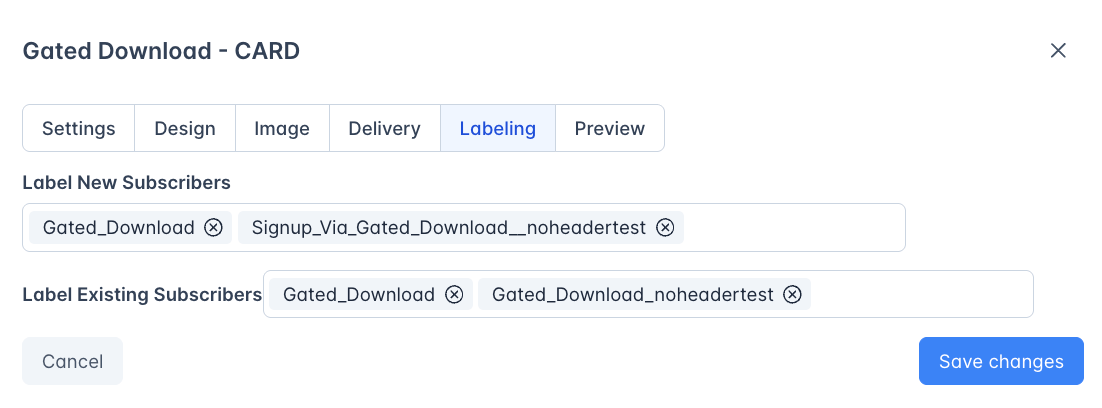 | Field | Description |
| ----------------------------------- | ------------------------------------------------------------------------ |
| **Labels for new subscribers** | Labels applied to readers who sign up specifically to download this file |
| **Labels for existing subscribers** | Labels applied to existing members who download the file |
These labels are useful for building segments and triggering [Basic Autoresponder](/features/basic-autoresponder) actions: for example, sending a follow-up email to everyone who downloaded a specific report.
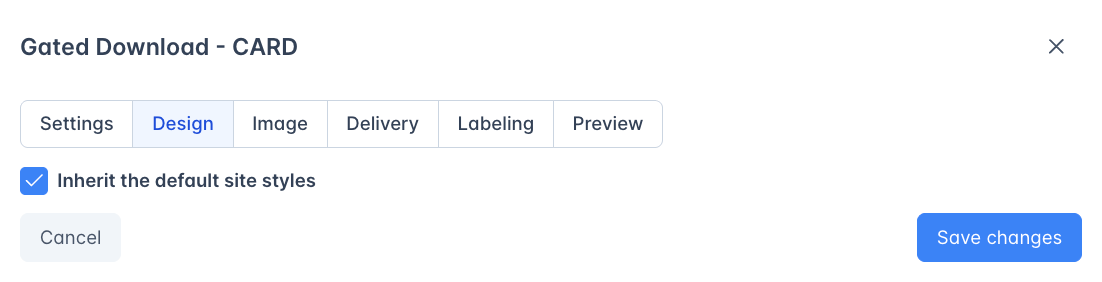
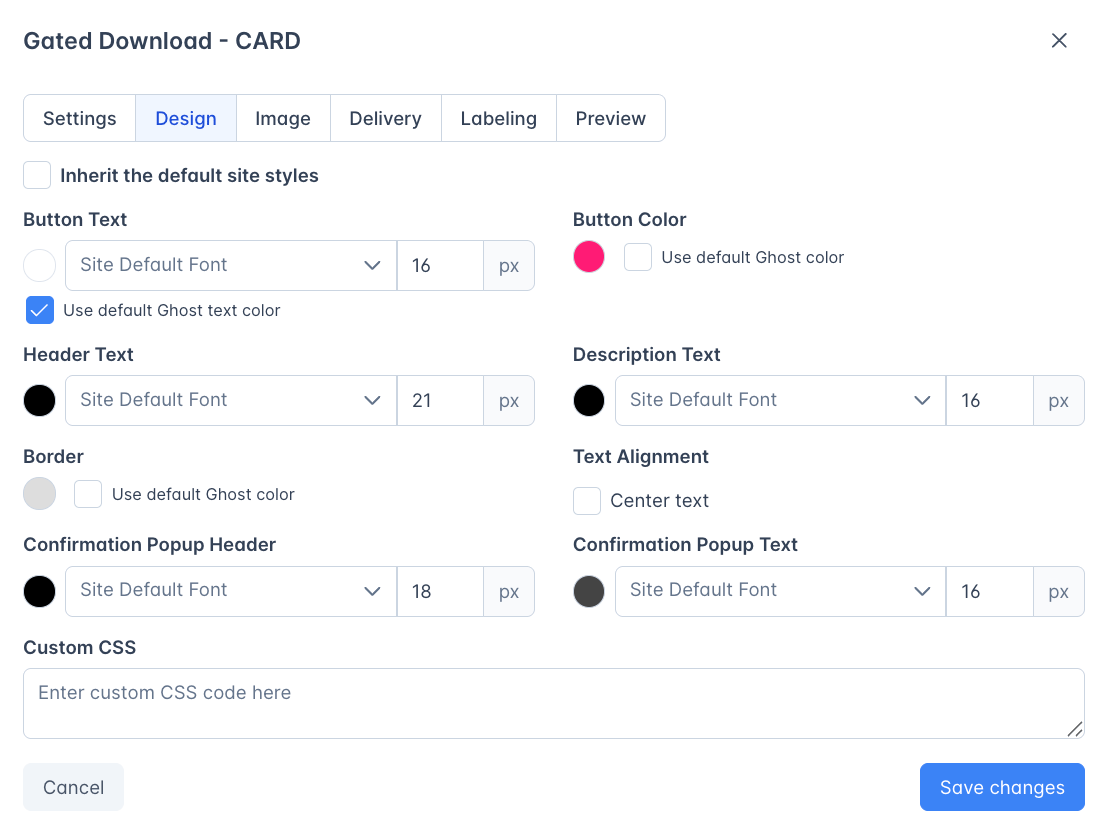
### Design tab
Settings auto-default to site settings, but if you'd like to customize the gated download cards just uncheck the default site settings and the design palette will pop up:
| Field | Description |
| ----------------------------------- | ------------------------------------------------------------------------ |
| **Labels for new subscribers** | Labels applied to readers who sign up specifically to download this file |
| **Labels for existing subscribers** | Labels applied to existing members who download the file |
These labels are useful for building segments and triggering [Basic Autoresponder](/features/basic-autoresponder) actions: for example, sending a follow-up email to everyone who downloaded a specific report.
### Design tab
Settings auto-default to site settings, but if you'd like to customize the gated download cards just uncheck the default site settings and the design palette will pop up:
 | Field | Description |
| ---------------------- | --------------------------------------------------------------------------------------------------- |
| **Use default design** | This inherits site styling from the [Default Design](/features/cta-library#default-design) settings |
| **Custom design** | Override colors, fonts, and styling for this specific download |
### Image tab
Card and Box display styles have an additional **Image** tab, for the logo shown above the header text. The image must be square (1:1 ratio): at least 480 pixels wide for the Card style, at least 120 pixels wide for the Box style. The Button style has no image and no Image tab.
## Display styles
| Style | Description |
| ---------- | ----------------------------------------------------------------- |
| **Button** | A simple download button: minimal, inline |
| **Card** | A product card with header text, description, and download button |
| **Box** | A larger box format with more visual presence |
## Embedding in Ghost
| Field | Description |
| ---------------------- | --------------------------------------------------------------------------------------------------- |
| **Use default design** | This inherits site styling from the [Default Design](/features/cta-library#default-design) settings |
| **Custom design** | Override colors, fonts, and styling for this specific download |
### Image tab
Card and Box display styles have an additional **Image** tab, for the logo shown above the header text. The image must be square (1:1 ratio): at least 480 pixels wide for the Card style, at least 120 pixels wide for the Box style. The Button style has no image and no Image tab.
## Display styles
| Style | Description |
| ---------- | ----------------------------------------------------------------- |
| **Button** | A simple download button: minimal, inline |
| **Card** | A product card with header text, description, and download button |
| **Box** | A larger box format with more visual presence |
## Embedding in Ghost
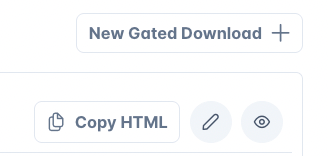 Each Gated Download has a **Copy HTML** button. Click it to copy the embed code, then paste it into a Ghost post or page using an HTML card (Post Editor → **+** → Raw HTML).
## Subscribe and upgrade popups
When an unqualified reader tries to download, they see a popup:
* **Unknown visitors** see a subscribe popup
* **Free members** trying to access a paid-only file see an upgrade popup
You choose which popup each of those audiences gets on the [Gated Download slot](/features/cta-slots#gated-download) in Auto Display. The popup templates themselves, including their headline, body text, button text, and styling, sit on the **Gated Download** tab inside [Auto Display's Library](/features/cta-library#how-to-use-the-library). That is a different screen from the **Library** tab on this page, which is described below.
## Tracking
Each Gated Download shows stats in the list view:
| Metric | Description |
| ------------------------------- | --------------------------------------------------- |
| **Signed up for free** | Readers who created a free account to download |
| **Signed up for paid** | Readers who started a paid subscription to download |
| **Existing members downloaded** | Members who already had access and downloaded |
The aggregate stats appear in a blue summary box at the top of the page.
## Download URLs
Download links are hosted by Outpost. If keeping the file out of casual reshares matters, choose a delivery method that sends the PDF as an email attachment.
## Library tab
The Gated Download page has its own **Library** tab, next to **Gated Download** and below the summary statistics. It controls which display styles you can build a download from. Each of the **Button**, **Box**, and **Card** headings holds one row, named **Classic**, with a switch and **Preview** and **Edit** buttons.
* **The switch** controls whether that style is offered in the **Select base model** dialog when you click **New Gated Download +**. Switch a style off and it no longer appears there. Downloads you already built from it keep working.
* **Edit** opens the base style itself. Set the headline text, button copy, and styling here, and every download you create from it afterward starts that way. Downloads you have already created are separate records and don't change.
## Use cases
Gate a free ebook behind email signup to grow your free member list
Offer exclusive reports or templates as a perk for paid subscribers
Add a downloadable companion resource to specific posts
If you have PDF versions of your site, you can use these cards to build a PDF archive page in Ghost.
## Frequently asked questions
A Gated Download protects a specific downloadable file (PDF, ebook, template) that requires signup or a paid subscription to access. A paywall limits how many posts someone can read before being prompted to subscribe. Gated Downloads protect individual files; paywalls meter access to your articles.
Yes. "Free and paid subscribers" means free members and above. Paid members already exceed that requirement, so they can download it too.
They see a subscribe popup prompting them to sign up. You pick which popup on the Gated Download slot in Auto Display. Once they subscribe, they can access the file.
Yes, this is one of the primary use cases. Set access to "Free and paid subscribers," configure labels to tag new signups, and set up a [Basic Autoresponder](/features/basic-autoresponder) action triggered by that label. Visitors provide their email to download, growing your free member list.
The embed code itself will render in your post, but the subscribe and upgrade popups for unqualified readers are part of the Auto Display system. If Auto Display is off, those popups won't appear and unqualified readers can't sign up through the download prompt.
Treat them as shareable. Download links are hosted by Outpost, and the gate is what controls who reaches the download in the first place, so plan on a link being passed along once a reader has it. If keeping the file out of casual reshares matters, choose a delivery method that sends the PDF as an email attachment instead.
***
## Related features
Configure the subscribe/upgrade popups shown for Gated Downloads
Use download-triggered labels for segmentation and automation
Each Gated Download has a **Copy HTML** button. Click it to copy the embed code, then paste it into a Ghost post or page using an HTML card (Post Editor → **+** → Raw HTML).
## Subscribe and upgrade popups
When an unqualified reader tries to download, they see a popup:
* **Unknown visitors** see a subscribe popup
* **Free members** trying to access a paid-only file see an upgrade popup
You choose which popup each of those audiences gets on the [Gated Download slot](/features/cta-slots#gated-download) in Auto Display. The popup templates themselves, including their headline, body text, button text, and styling, sit on the **Gated Download** tab inside [Auto Display's Library](/features/cta-library#how-to-use-the-library). That is a different screen from the **Library** tab on this page, which is described below.
## Tracking
Each Gated Download shows stats in the list view:
| Metric | Description |
| ------------------------------- | --------------------------------------------------- |
| **Signed up for free** | Readers who created a free account to download |
| **Signed up for paid** | Readers who started a paid subscription to download |
| **Existing members downloaded** | Members who already had access and downloaded |
The aggregate stats appear in a blue summary box at the top of the page.
## Download URLs
Download links are hosted by Outpost. If keeping the file out of casual reshares matters, choose a delivery method that sends the PDF as an email attachment.
## Library tab
The Gated Download page has its own **Library** tab, next to **Gated Download** and below the summary statistics. It controls which display styles you can build a download from. Each of the **Button**, **Box**, and **Card** headings holds one row, named **Classic**, with a switch and **Preview** and **Edit** buttons.
* **The switch** controls whether that style is offered in the **Select base model** dialog when you click **New Gated Download +**. Switch a style off and it no longer appears there. Downloads you already built from it keep working.
* **Edit** opens the base style itself. Set the headline text, button copy, and styling here, and every download you create from it afterward starts that way. Downloads you have already created are separate records and don't change.
## Use cases
Gate a free ebook behind email signup to grow your free member list
Offer exclusive reports or templates as a perk for paid subscribers
Add a downloadable companion resource to specific posts
If you have PDF versions of your site, you can use these cards to build a PDF archive page in Ghost.
## Frequently asked questions
A Gated Download protects a specific downloadable file (PDF, ebook, template) that requires signup or a paid subscription to access. A paywall limits how many posts someone can read before being prompted to subscribe. Gated Downloads protect individual files; paywalls meter access to your articles.
Yes. "Free and paid subscribers" means free members and above. Paid members already exceed that requirement, so they can download it too.
They see a subscribe popup prompting them to sign up. You pick which popup on the Gated Download slot in Auto Display. Once they subscribe, they can access the file.
Yes, this is one of the primary use cases. Set access to "Free and paid subscribers," configure labels to tag new signups, and set up a [Basic Autoresponder](/features/basic-autoresponder) action triggered by that label. Visitors provide their email to download, growing your free member list.
The embed code itself will render in your post, but the subscribe and upgrade popups for unqualified readers are part of the Auto Display system. If Auto Display is off, those popups won't appear and unqualified readers can't sign up through the download prompt.
Treat them as shareable. Download links are hosted by Outpost, and the gate is what controls who reaches the download in the first place, so plan on a link being passed along once a reader has it. If keeping the file out of casual reshares matters, choose a delivery method that sends the PDF as an email attachment instead.
***
## Related features
Configure the subscribe/upgrade popups shown for Gated Downloads
Use download-triggered labels for segmentation and automation