> ## Documentation Index
> Fetch the complete documentation index at: https://documentation.outpost.pub/llms.txt
> Use this file to discover all available pages before exploring further.
# Inactive Member Clean Up
> Remove free members who have unsubscribed from your newsletters to reduce hosting costs and keep your member list accurate.
Member Cleanup is available on all Outpost plans.
The Member Cleanup tool removes free-tier members who have unsubscribed from all of your newsletters. For many publications, these members are no longer engaged. Removing them reduces your Ghost hosting costs (which are often based on member count) and gives you a more accurate picture of your active audience. This is especially useful for sites managing hosting costs closely.
Member Cleanup only removes **free members who have unsubscribed**. It never touches paid, complimentary, gifted, or group members, regardless of their newsletter subscription status.
 ## How it works
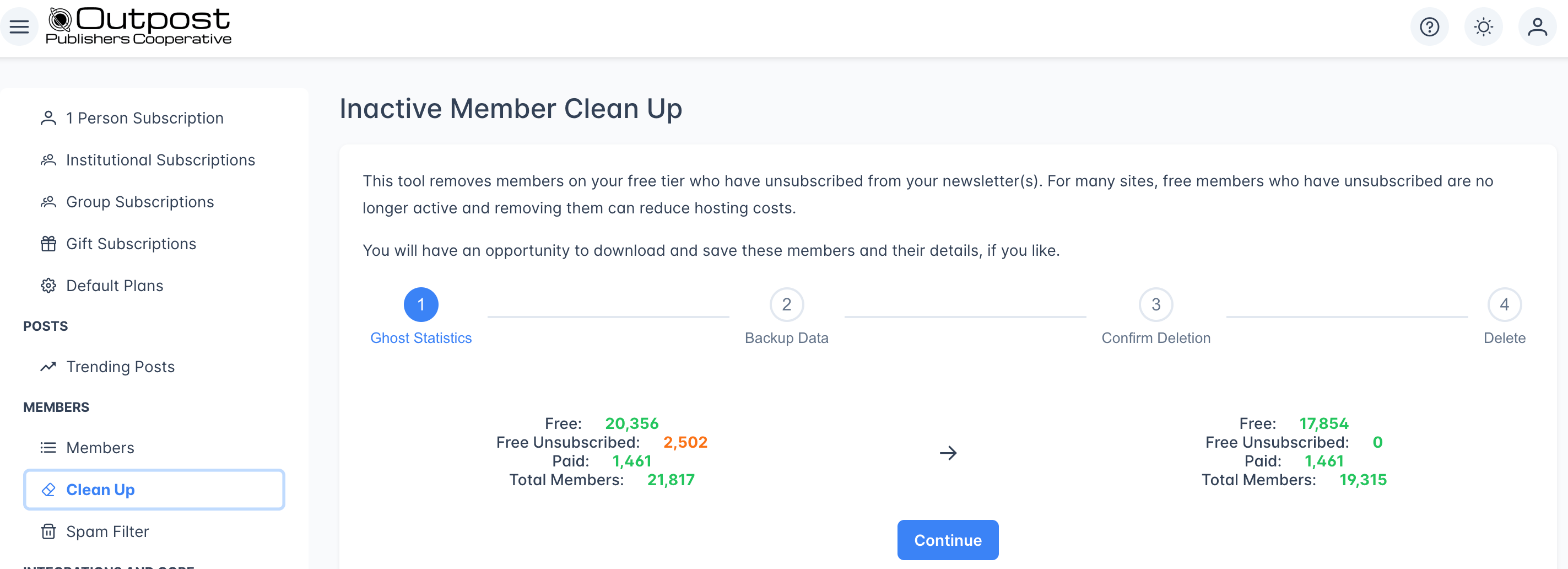
Member Cleanup is a guided 4-step wizard. Each step must be completed before moving to the next.
The first step shows a before-and-after comparison of your member counts:
| Metric | Current | After cleanup |
| --------------------- | ----------------------------------------- | ------------------------------------- |
| **Free members** | Your total free-tier members | Free members minus unsubscribed |
| **Free Unsubscribed** | Free members who opted out of newsletters | 0 |
| **Paid members** | Your paid/complimentary members | Unchanged |
| **Total members** | All members combined | Total minus unsubscribed free members |
If you have no unsubscribed free members, the **Continue** button will be disabled: there's nothing to clean up.
Before deleting any members, you can download a CSV backup of the members that will be removed. This CSV contains their email addresses and profile details.
For most publications, the backup CSV isn't necessary: these members have already unsubscribed and are unlikely to re-engage. Download it if you'd like a record before proceeding.
Click **Continue** when you're ready.
Confirm that you want to remove the specified number of free members who unsubscribed. Click the red **Yes, I want to remove these members from Ghost** button to proceed.
Outpost removes the members in the background. Depending on the number of members being removed, this can take some time. You'll receive an email notification (sent to your account email) when the cleanup is complete.
You can safely navigate away from this page: the cleanup will continue running.
***
## What gets removed
* **Free-tier members** whose newsletter subscription status is set to unsubscribed
* These members are removed from both Outpost and Ghost
## What stays untouched
* Paid members (even if unsubscribed from newsletters)
* Complimentary members
* Gift subscription recipients
* Group subscription members
* Free members who are still subscribed to at least one newsletter
***
## Related features
View and manage your full member list.
Block spam signups with email, domain, or keyword rules.
Export your member list or segments to CSV.
***
## FAQ
No. Member Cleanup **only** removes free-tier members who have unsubscribed. Paid, complimentary, gifted, and group members are never affected, even if they've turned off email notifications.
No. Once members are removed, the action cannot be undone. If you downloaded the backup CSV in Step 2, you can re-import those members into Ghost, but they will return as new free members without their original signup dates or activity history.
It depends on how many members are being removed. A few hundred members may take just a few minutes. Larger cleanups (thousands of members) may take longer. You'll receive an email when it's complete.
Many Ghost hosting plans charge based on member count. Free members who have unsubscribed from your newsletters are unlikely to re-engage: they don't receive your emails and don't pay for content. Removing them reduces your hosting costs and gives you a more accurate count of your active audience.
That's up to you. Some publications run it monthly, others quarterly. Check the statistics in Step 1 periodically to see if you have a significant number of unsubscribed free members accumulating.
## How it works
Member Cleanup is a guided 4-step wizard. Each step must be completed before moving to the next.
The first step shows a before-and-after comparison of your member counts:
| Metric | Current | After cleanup |
| --------------------- | ----------------------------------------- | ------------------------------------- |
| **Free members** | Your total free-tier members | Free members minus unsubscribed |
| **Free Unsubscribed** | Free members who opted out of newsletters | 0 |
| **Paid members** | Your paid/complimentary members | Unchanged |
| **Total members** | All members combined | Total minus unsubscribed free members |
If you have no unsubscribed free members, the **Continue** button will be disabled: there's nothing to clean up.
Before deleting any members, you can download a CSV backup of the members that will be removed. This CSV contains their email addresses and profile details.
For most publications, the backup CSV isn't necessary: these members have already unsubscribed and are unlikely to re-engage. Download it if you'd like a record before proceeding.
Click **Continue** when you're ready.
Confirm that you want to remove the specified number of free members who unsubscribed. Click the red **Yes, I want to remove these members from Ghost** button to proceed.
Outpost removes the members in the background. Depending on the number of members being removed, this can take some time. You'll receive an email notification (sent to your account email) when the cleanup is complete.
You can safely navigate away from this page: the cleanup will continue running.
***
## What gets removed
* **Free-tier members** whose newsletter subscription status is set to unsubscribed
* These members are removed from both Outpost and Ghost
## What stays untouched
* Paid members (even if unsubscribed from newsletters)
* Complimentary members
* Gift subscription recipients
* Group subscription members
* Free members who are still subscribed to at least one newsletter
***
## Related features
View and manage your full member list.
Block spam signups with email, domain, or keyword rules.
Export your member list or segments to CSV.
***
## FAQ
No. Member Cleanup **only** removes free-tier members who have unsubscribed. Paid, complimentary, gifted, and group members are never affected, even if they've turned off email notifications.
No. Once members are removed, the action cannot be undone. If you downloaded the backup CSV in Step 2, you can re-import those members into Ghost, but they will return as new free members without their original signup dates or activity history.
It depends on how many members are being removed. A few hundred members may take just a few minutes. Larger cleanups (thousands of members) may take longer. You'll receive an email when it's complete.
Many Ghost hosting plans charge based on member count. Free members who have unsubscribed from your newsletters are unlikely to re-engage: they don't receive your emails and don't pay for content. Removing them reduces your hosting costs and gives you a more accurate count of your active audience.
That's up to you. Some publications run it monthly, others quarterly. Check the statistics in Step 1 periodically to see if you have a significant number of unsubscribed free members accumulating.