> ## Documentation Index
> Fetch the complete documentation index at: https://documentation.outpost.pub/llms.txt
> Use this file to discover all available pages before exploring further.
# Connecting Ghost
> Link your Ghost site to Outpost to sync members, labels, and subscription data.
Connecting your Ghost site is the first step in the Outpost setup wizard. You'll be walked through it automatically when you create your account. Once connected, Outpost syncs your members and posts and can embed conversion tools in your content.
## Ghost hosting compatibility
Outpost works with:
* **Ghost (Pro)**: the hosting service run by the team behind Ghost. Outpost works with any Ghost (Pro) plan that supports custom integrations and theme customization.
* **Magic Pages**: managed Ghost hosting that supports custom integrations.
* **Self-hosted Ghost or other hosting service**: any server where you can access Ghost Admin → Settings → Integrations.
Outpost requires custom-integration access in Ghost. The lowest Ghost (Pro) tier doesn't allow custom API integrations or theme customizations and won't work with Outpost. Choose a tier that supports them.
## Prerequisites
* A Ghost site on Ghost 5.x or later
* Admin access to your Ghost dashboard
## Setup
The easiest way to connect is during the Outpost signup flow. The connection wizard walks you through each step. If you're connecting after initial setup, go to **Integrations and Core Connections → Core Connections** in Outpost.
In your Ghost Admin dashboard:
1. Go to **Settings → Advanced → Integrations**
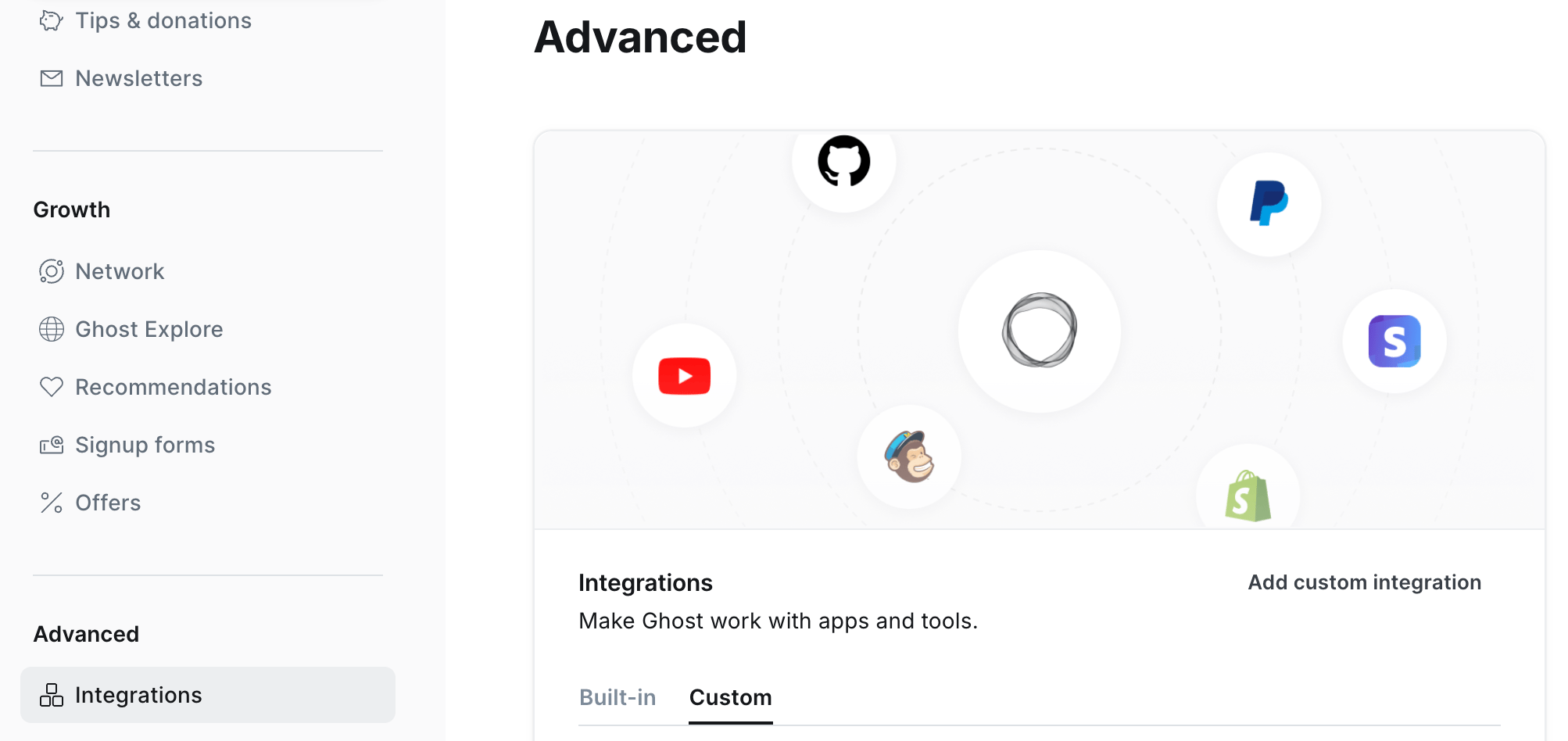 2. Click **Add custom integration**
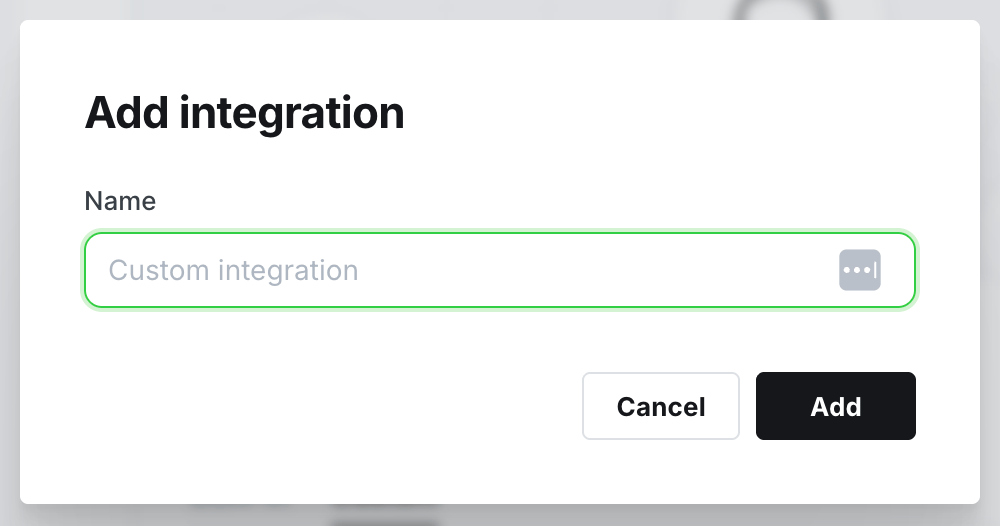 3. Name it "Outpost" and click **Create**
4. You'll see a **Content API Key**, **Admin API Key**, and **API URL**
Keep this API information open in a tab or window for the next step
Copy the three values from your Ghost integration into Outpost:
* **Content API Key**
* **Admin API Key**
* **API URL**: e.g. `https://yoursite.com`
During signup, the connection wizard provides a direct shortcut link to your Ghost integrations page: no need to navigate there manually.
Click **Check Connection**. Outpost will verify it can reach your Ghost site and then:
* **Set up automatic updates** so member, tag, and site changes stay in sync
* **Import your existing members** and posts
* **Sync your tiers** so they're available for segmentation and automation
Once connected, you'll see a summary of how many members and posts were found.
You do **not** need to configure anything manually in Ghost after connecting. Outpost automatically sets up all the real-time updates it needs to stay in sync with your Ghost site.
## How sync works
| Direction | What syncs |
| --------------- | ---------------------------------------------------------------------------------------------------------------------------------------------- |
| Ghost → Outpost | Members created, updated, and deleted; tags added, edited, and deleted; site setting changes. Tags map to Outpost **labels** for segmentation. |
| Outpost → Ghost | Labels and member metadata. (Outpost labels are written back as tags on the Ghost member.) |
Ghost is the **source of truth for members and subscriptions**. Stripe billing flows directly between Stripe and Ghost. Outpost reads that data to power automation, segmentation, and conversion tools.
## Tiers
Tiers are created and managed in Ghost. Outpost reads your Ghost tiers so you can reference them in segmentation, offers, access rules, and automation triggers.
To refresh tiers after making changes in Ghost, go to **Account → Publication Details** and click **Refresh** with the Site settings option checked.
## Troubleshooting
Go to **Account → Publication Details** and click **Refresh** with both Site settings and Site data checked. This re-syncs all members from Ghost.
The connection may have been interrupted. Go to **Integrations and Core Connections → Core Connections** and re-save your Ghost credentials. Outpost will restore the sync automatically.
Outpost requires a Ghost (Pro) tier that supports custom integrations and theme customization. Check your current tier in your Ghost (Pro) account dashboard and upgrade if needed.
In Ghost Admin, go to **Settings → Integrations → Outpost** (the custom integration you created). The Content API Key, Admin API Key, and API URL are all shown there.
***
## Related features
Full details on the Ghost integration, settings, and sync behavior.
Refresh Ghost data and manage site settings synced from Ghost.
3. Name it "Outpost" and click **Create**
4. You'll see a **Content API Key**, **Admin API Key**, and **API URL**
Keep this API information open in a tab or window for the next step
Copy the three values from your Ghost integration into Outpost:
* **Content API Key**
* **Admin API Key**
* **API URL**: e.g. `https://yoursite.com`
During signup, the connection wizard provides a direct shortcut link to your Ghost integrations page: no need to navigate there manually.
Click **Check Connection**. Outpost will verify it can reach your Ghost site and then:
* **Set up automatic updates** so member, tag, and site changes stay in sync
* **Import your existing members** and posts
* **Sync your tiers** so they're available for segmentation and automation
Once connected, you'll see a summary of how many members and posts were found.
You do **not** need to configure anything manually in Ghost after connecting. Outpost automatically sets up all the real-time updates it needs to stay in sync with your Ghost site.
## How sync works
| Direction | What syncs |
| --------------- | ---------------------------------------------------------------------------------------------------------------------------------------------- |
| Ghost → Outpost | Members created, updated, and deleted; tags added, edited, and deleted; site setting changes. Tags map to Outpost **labels** for segmentation. |
| Outpost → Ghost | Labels and member metadata. (Outpost labels are written back as tags on the Ghost member.) |
Ghost is the **source of truth for members and subscriptions**. Stripe billing flows directly between Stripe and Ghost. Outpost reads that data to power automation, segmentation, and conversion tools.
## Tiers
Tiers are created and managed in Ghost. Outpost reads your Ghost tiers so you can reference them in segmentation, offers, access rules, and automation triggers.
To refresh tiers after making changes in Ghost, go to **Account → Publication Details** and click **Refresh** with the Site settings option checked.
## Troubleshooting
Go to **Account → Publication Details** and click **Refresh** with both Site settings and Site data checked. This re-syncs all members from Ghost.
The connection may have been interrupted. Go to **Integrations and Core Connections → Core Connections** and re-save your Ghost credentials. Outpost will restore the sync automatically.
Outpost requires a Ghost (Pro) tier that supports custom integrations and theme customization. Check your current tier in your Ghost (Pro) account dashboard and upgrade if needed.
In Ghost Admin, go to **Settings → Integrations → Outpost** (the custom integration you created). The Content API Key, Admin API Key, and API URL are all shown there.
***
## Related features
Full details on the Ghost integration, settings, and sync behavior.
Refresh Ghost data and manage site settings synced from Ghost.