> ## Documentation Index
> Fetch the complete documentation index at: https://documentation.outpost.pub/llms.txt
> Use this file to discover all available pages before exploring further.
# Plausible Integration
> Privacy-friendly web analytics for your Ghost publication, hosted by Outpost on a shared Plausible account.
[Plausible](https://plausible.io) is a privacy-friendly, open-source web analytics alternative to Google Analytics. Outpost runs and pays for a Plausible account that hosts each publisher's site, so analytics work without you setting up your own Plausible subscription.
## How it works
* **Outpost-hosted account.** We run a Plausible account that holds many publisher sites. Outpost creates and pays for the account that contains your site.
* **Embedded dashboard.** The Plausible dashboard appears inside Outpost so you can view traffic alongside your membership metrics. See [Plausible Dashboard](/features/plausible-dashboard) for what's surfaced.
* **Direct Plausible login.** You can also log into Plausible directly to see more data and configure things like custom events, goals, and funnels. We add publisher email addresses as users on the account.
* **Team access.** Add as many people from your team as admins or viewers on the Plausible account. There is no limit.
* **No publisher API access.** API access to the Outpost-hosted Plausible account is not available; analytics are read-only via the dashboard.
## Setup
Plausible setup typically happens during Outpost's onboarding, when the team adds your site to the shared Plausible account. From there it's self-serve: Outpost generates a tracking snippet for your site that you copy from the integration screen and paste into Ghost.
In Outpost, go to **Integrations → Plausible** and copy the tracking snippet generated for your site. Copy the **entire** snippet block: it includes a second initialization line, and event tracking won't work if you leave it out.
In Ghost, go to **Settings → Code injection** and paste the snippet into the **Site Header** section. Save. The script starts collecting traffic data immediately.
Once the script is live, traffic data appears in the [Plausible Dashboard](/features/plausible-dashboard) inside Outpost.
## Logging into Plausible directly
To set up custom events, configure goals, or invite team members to view the analytics, log into Plausible directly with the email Outpost added as a user. From there you can:
* Manage team users (admins or viewers).
* Configure goals, custom events, and funnels.
* See data Outpost doesn't surface in the embedded dashboard.
## Transferring an existing Plausible account in
If you already have a Plausible account and you want Outpost to take over hosting and billing:
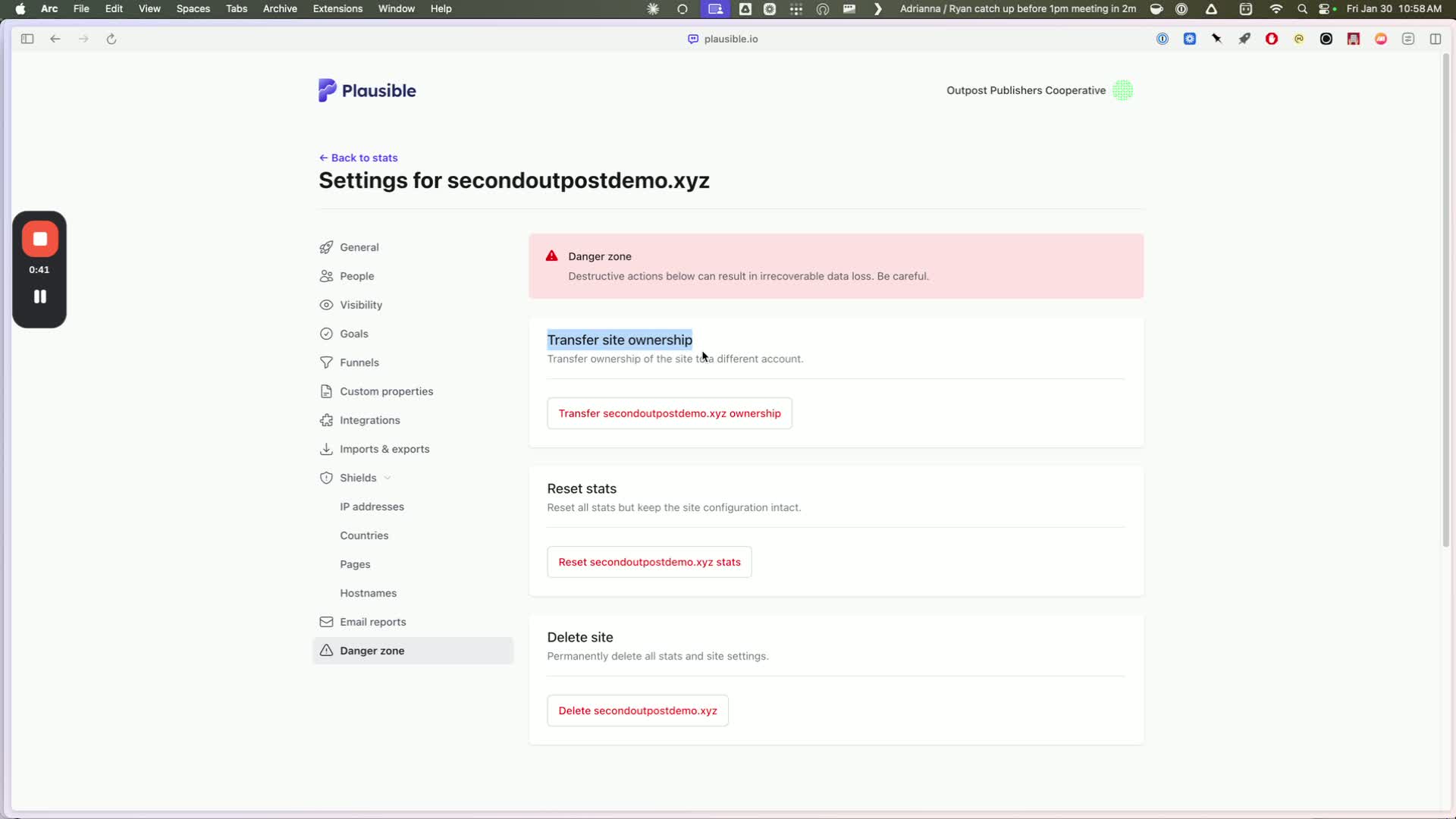
In Plausible, go to **Site Settings → Danger Zone → Transfer Site Ownership**.
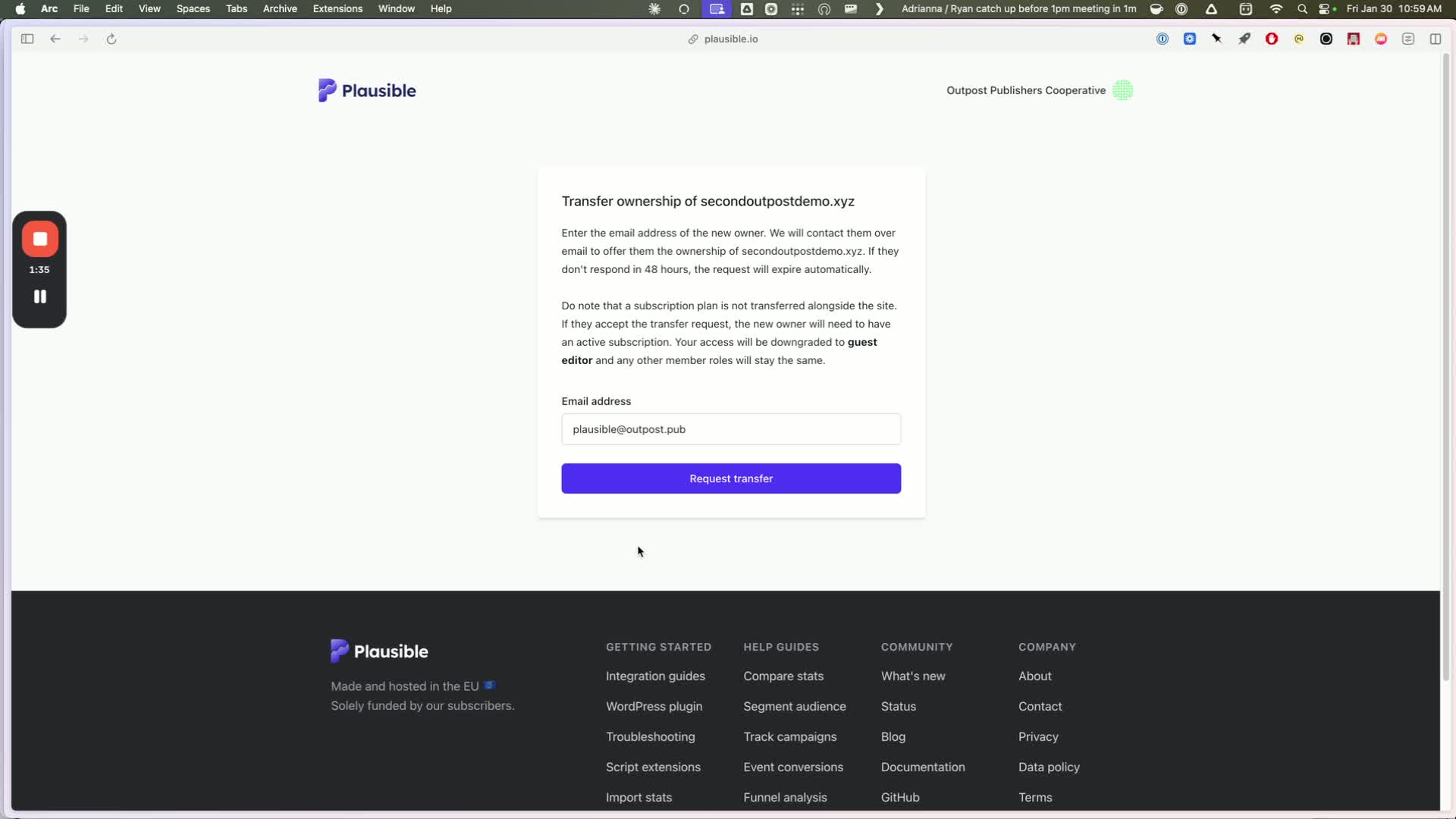
 Enter **[plausible@outpost.pub](mailto:plausible@outpost.pub)** in the transfer form and click **Request Transfer**.
 Email **[support@outpost.pub](mailto:support@outpost.pub)** so we accept the transfer and start paying for the account.
Once accepted, the embedded dashboard should appear in your Outpost Control Center within a few minutes. If it doesn't show up, go to **Integrations → Plausible** in Outpost and activate it.
If your site doesn't already have the Plausible tracking snippet installed, paste the one Outpost provides into **Ghost → Code injection → Site Header**.
Back in Plausible, cancel your paid subscription so you aren't double-billed. Cancelling **does not delete your historical data**: it only stops billing on your Plausible account.
Don't skip the final step. If your Plausible subscription stays active after we take over billing, you'll be paying twice. Email [support@outpost.pub](mailto:support@outpost.pub) if you need help confirming the cutover.
## Transferring out
If you leave Outpost and want to keep your Plausible analytics, we transfer ownership of the account to you and you take over the Plausible payment. Contact [support@outpost.pub](mailto:support@outpost.pub) to start the transfer.
## Changing your site URL
If you change your site's domain or URL structure, Plausible's site settings and the JavaScript snippet usually need updating to keep tracking accurate. Email **[support@outpost.pub](mailto:support@outpost.pub)** for the migration steps for your specific change.
## Privacy
Plausible is cookieless and does not collect personal data, which means GDPR compliance without a cookie consent banner.
## Related features
The embedded Plausible dashboard inside Outpost.
Outpost analytics that incorporate web traffic data.
## FAQ
No. Outpost runs and pays for the Plausible account that hosts your site.
Not on the Outpost-hosted Plausible account. Analytics are available through the embedded dashboard in Outpost and the Plausible web UI when you log in directly.
Yes. Outpost can add anyone from your team as an admin or viewer on the Plausible account. Email [support@outpost.pub](mailto:support@outpost.pub) with the email addresses to add.
We transfer ownership of the Plausible account to you. From that point you cover the Plausible bill directly and keep all your historical data. Contact [support@outpost.pub](mailto:support@outpost.pub) when you're ready to make the switch.
Email **[support@outpost.pub](mailto:support@outpost.pub)** so we accept the transfer and start paying for the account.
Once accepted, the embedded dashboard should appear in your Outpost Control Center within a few minutes. If it doesn't show up, go to **Integrations → Plausible** in Outpost and activate it.
If your site doesn't already have the Plausible tracking snippet installed, paste the one Outpost provides into **Ghost → Code injection → Site Header**.
Back in Plausible, cancel your paid subscription so you aren't double-billed. Cancelling **does not delete your historical data**: it only stops billing on your Plausible account.
Don't skip the final step. If your Plausible subscription stays active after we take over billing, you'll be paying twice. Email [support@outpost.pub](mailto:support@outpost.pub) if you need help confirming the cutover.
## Transferring out
If you leave Outpost and want to keep your Plausible analytics, we transfer ownership of the account to you and you take over the Plausible payment. Contact [support@outpost.pub](mailto:support@outpost.pub) to start the transfer.
## Changing your site URL
If you change your site's domain or URL structure, Plausible's site settings and the JavaScript snippet usually need updating to keep tracking accurate. Email **[support@outpost.pub](mailto:support@outpost.pub)** for the migration steps for your specific change.
## Privacy
Plausible is cookieless and does not collect personal data, which means GDPR compliance without a cookie consent banner.
## Related features
The embedded Plausible dashboard inside Outpost.
Outpost analytics that incorporate web traffic data.
## FAQ
No. Outpost runs and pays for the Plausible account that hosts your site.
Not on the Outpost-hosted Plausible account. Analytics are available through the embedded dashboard in Outpost and the Plausible web UI when you log in directly.
Yes. Outpost can add anyone from your team as an admin or viewer on the Plausible account. Email [support@outpost.pub](mailto:support@outpost.pub) with the email addresses to add.
We transfer ownership of the Plausible account to you. From that point you cover the Plausible bill directly and keep all your historical data. Contact [support@outpost.pub](mailto:support@outpost.pub) when you're ready to make the switch.