

How do subscription renewals work?
How do subscription renewals work?
Stripe handles subscription renewals automatically. On each renewal date, Stripe charges the member’s payment method. If successful, Ghost extends the member’s access period.You don’t need to do anything for renewals: they’re fully automated.
What happens when a member's renewal payment fails?
What happens when a member's renewal payment fails?
When Stripe reports a payment failure:
- Stripe retries the charge automatically on the schedule configured in your Stripe dashboard (Stripe’s Smart Retries / Subscription settings → Manage failed payments). The retry window and grace period live in Stripe, not in Outpost.
- Outpost triggers the payment failure email flow during the Stripe retry window, which we strongly recommend setting to 10 to 21 days. Once a day, Outpost also looks for subscribers whose payment has been failing for three to ten days and who are not already in the flow, and starts it for them. Their flow starts from the day they were picked up.
- If a retry succeeds or the member updates their payment method, the member’s status returns to active.
- If Stripe exhausts its retries without a successful charge, Stripe cancels the subscription and Ghost moves the member out of paid access.
Can members update their payment method?
Can members update their payment method?
Yes. Members can update their payment method through their Ghost member portal, and Outpost picks up the change automatically.You can also send them a payment update link directly from Stripe. See the next question for the steps.
How do I send a payment update link to a subscriber or their assistant?
How do I send a payment update link to a subscriber or their assistant?
Stripe can generate a payment update link for a subscription. The link works for that one subscription only, and the only thing it can do is replace the card on file. That makes it safe to send to the subscriber or to whoever manages their billing, such as an assistant.
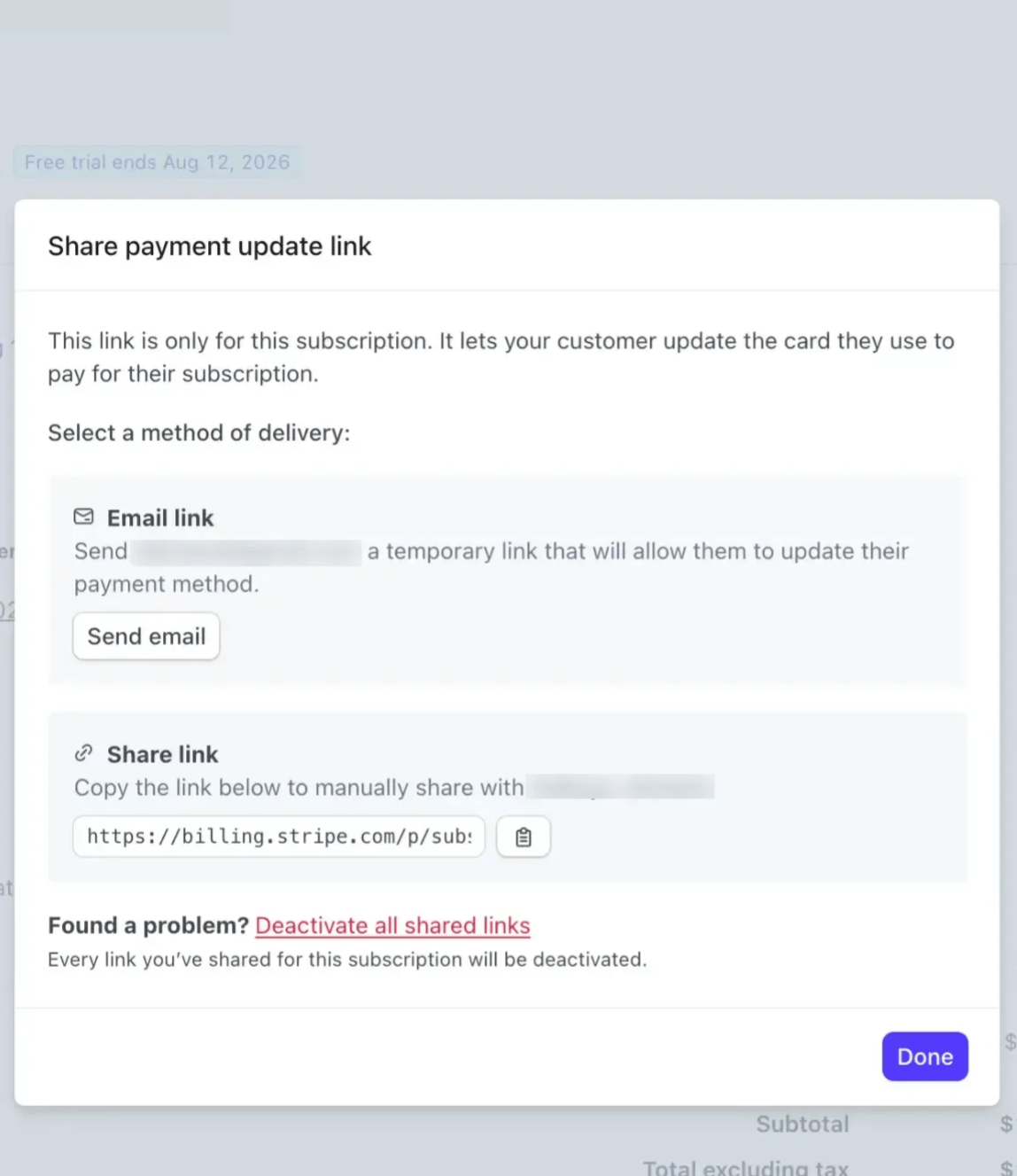
- In Stripe, open the subscriber’s customer record and click the subscription itself. You need to be on the subscription page, not the customer page.
- Click the menu button (three dots) next to the Update subscription button.
- Choose Share payment update link.
- Email link: Stripe emails the subscriber a temporary link to update their payment method.
- Share link: copy the link and send it yourself, for example to an assistant or whoever manages the subscriber’s billing.
How do I change the credit card I use for my Outpost subscription?
How do I change the credit card I use for my Outpost subscription?
Go to Settings → Publication Details and scroll to the subscription section. Click View invoices and payment method: this takes you to Stripe, where you can update your card on file.Your next billing cycle will automatically use the new payment method.
How do refunds for my subscribers work?
How do refunds for my subscribers work?
These are rare and you can handle these from your Stripe account.Refunds don’t automatically cancel the subscription: you can refund and keep the member active, or refund and cancel at the same time.
Can members pause their subscription?
Can members pause their subscription?
Outpost and Ghost don’t have a native “pause” feature. Options for members who want to pause:
- Cancel and resubscribe later (they lose their billing date and may face a new rate)
- Upgrade to annual billing to reduce renewal frequency
- Contact support for a manual comp extension
Do members in different countries pay different taxes?
Do members in different countries pay different taxes?
Outpost and Ghost do not manage tax calculation directly. If your publication needs to collect VAT, GST, or sales tax, enable Stripe Tax in your Stripe account. Stripe Tax calculates and collects the appropriate tax based on the member’s location. Check the Ghost documentation for this.
Can I offer a free trial?
Can I offer a free trial?
Yes. When creating a tier, set a trial period (in days). Members who subscribe to a tier with a trial period aren’t charged until the trial ends. During the trial, they have full paid access.You can also create trials via offers: a trial offer applied to a tier without a built-in trial period.
Why am I seeing new paid subscribers with free trials I never set up?
Why am I seeing new paid subscribers with free trials I never set up?
Those are almost certainly not real free trials. When Outpost needs a new paid subscription to start in the future, it schedules the start date by giving the subscription a trial that runs until that date. The trial is as long as the paid time the subscriber has left, so on an annual plan it can read as hundreds of days. Ghost sees a paid subscription with a trial on it and sends its usual “new paid subscriber” notification with a line like “15 days free”, even though the site doesn’t offer trials. The trial line itself is new: Ghost added it to this notification in May 2026.The two common causes:
- A plan change that waits for the renewal date. A subscriber moves to a cheaper plan or a shorter billing period, for example by accepting a retention offer or downgrading from annual to monthly. Starting the cheaper plan mid-term would mean crediting money back, so Outpost creates the new subscription right away and sets it to begin when the current paid term ends. Nothing is charged at that moment: the first charge lands on the day the new plan starts.
- A sign-up while an old subscription still has paid days left. A subscriber cancels, keeps their remaining paid time, and then goes through checkout again, often brought back by a cancellation or retention email. The new subscription gets a trial exactly as long as the paid days remaining, so they are not billed twice for the same period.