

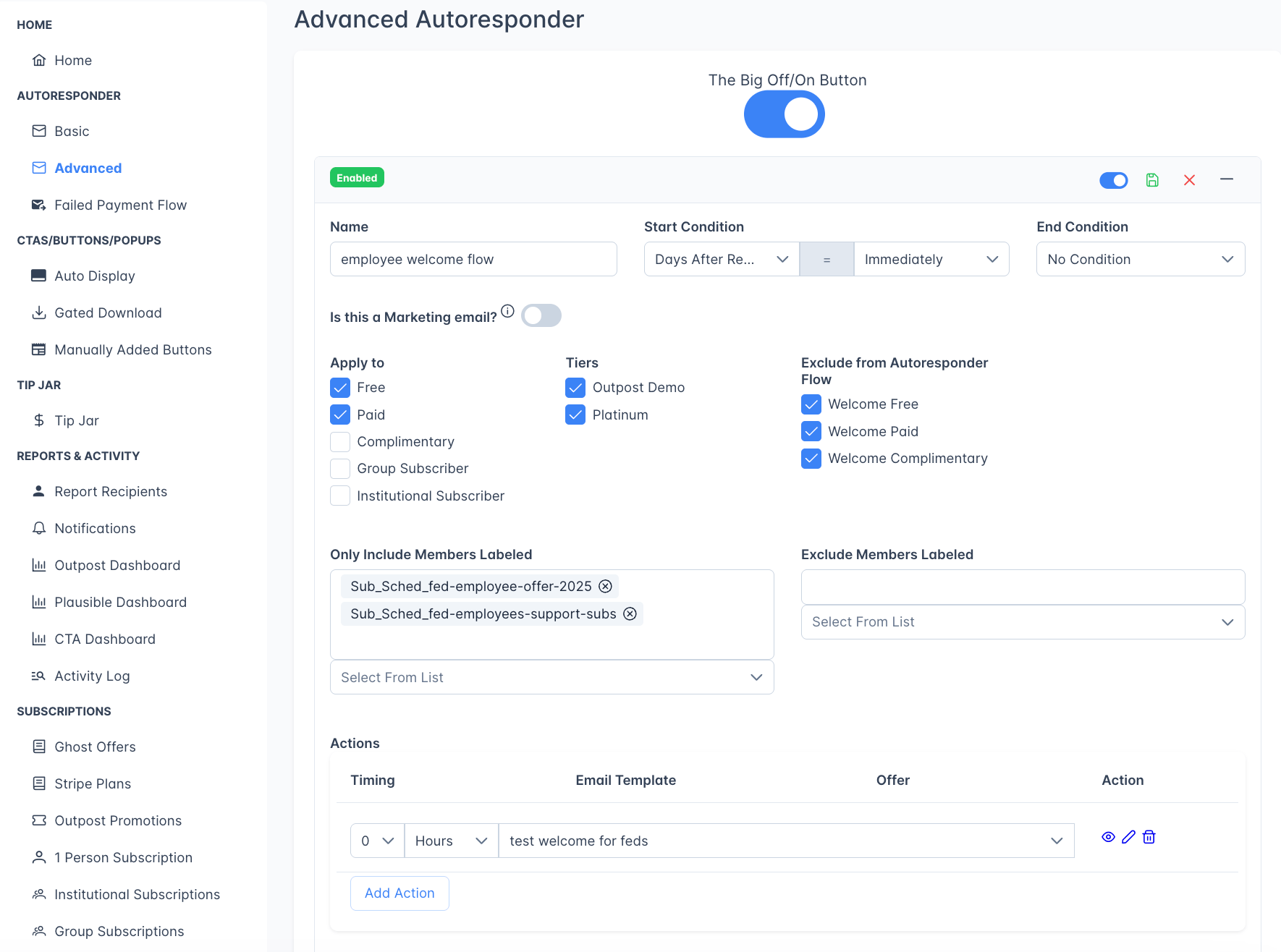
The Advanced Autoresponder with custom email flow configuration
The Big Off/On Button
The Advanced Autoresponder has its own independent master toggle called “The Big Off/On Button.” This is separate from the Basic Autoresponder toggle. Turning off one does not affect the other.
Turning flows off with active members
When you switch off The Big Off/On Button (or disable an individual flow) and there are members currently moving through that flow, Outpost asks how to handle them with a “Members are in active flows” prompt. You get three choices:- Keep Running: Cancel the change and leave the flow on.
- Finish Active Members, No New Ones: Turn the flow off so no new members enter it, but let everyone already in it finish the remaining steps.
- Stop All Immediately: Turn the flow off and stop every active member right away. They receive no further emails from that flow.
When you use The Big Off/On Button rather than a single flow’s toggle, this prompt covers every advanced flow at once: Outpost tells you how many members are active across all your flows, and Stop All Immediately ends them in every flow in one step.
Creating a flow
Click “Add Flow” at the bottom of the page.
Flow name
A descriptive name for your reference (e.g., “30-Day Win-Back Sequence” or “VIP Member Welcome”).Start condition
What triggers the flow. Choose from:
Timing options for day-based conditions: Immediately, 1–6 days, 1–10 weeks, or 1 month. (There’s no 7-, 8-, or 9-day option: the dropdown jumps from 6 days to 1 week, then 10 days, then 2 weeks and up.)
End condition
What stops the flow early (before all steps are sent):Marketing email toggle

Audience targeting
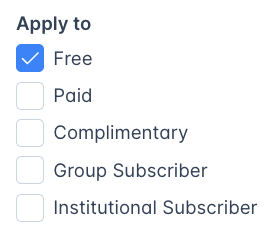
- Free: Free subscribers
- Paid: Paid subscribers (with optional tier filtering)
- Complimentary: Members with complimentary subscriptions
- Group Subscriber: Members with group subscriptions
- Institutional Subscriber: Members with institutional subscriptions
Flows that send to existing subscribers
When the audience includes Paid, Complimentary, Group Subscriber, Institutional Subscriber, or All membership types, a warning appears under the audience options. It is a standing reminder rather than an error. A link to a Ghost offer does not work for a reader who already has a subscription. A signed-in reader is told they already have an active subscription, and a reader who is signed out can end up paying for a second one. Choose an offer and use%OFFER_URL% as the link in the email, including for buttons. Use that variable instead of the full web address, and Outpost substitutes it. Outpost then gives each reader a checkout link that upgrades the subscription they already have. A promo code will not work for these readers either, because they never reach a checkout page where a code could be typed. See Upgrading existing subscribers for the full explanation.
New flows start with All membership types checked, so the warning is on screen until you narrow the audience.
Autoresponder exclusions
Under Exclude members in these autoresponders, optionally exclude members who would also go into a Basic Autoresponder sequence:- Welcome Free
- Welcome Paid (e.g. thank you emails)
- Welcome Complimentary
Site-wide exclusions
Autoresponder Settings lets you globally exclude paid and complimentary members on specific Stripe prices, Stripe products, or Ghost tiers, and that includes Advanced Autoresponder flows. Free members are never checked there. In practice the Ghost tier rule is the one that reaches complimentary members, because most of them have no Stripe price or product. Excluding a tier therefore also stops flow email to any gift recipients, group subscription seat holders, and members you comped by hand on it. An excluded member isn’t removed from an Advanced Autoresponder flow, they receive nothing from it while the exclusion applies. If they later move off the excluded price, product, or tier, the flow resumes and sends whichever steps they haven’t already received.Label filters
Label filters narrow the audience in addition to the membership types and start condition above, never instead of them. A member only gets the flow if they meet the start condition, fall into a checked membership type (when any are checked), and clear both label filters:- Include members labeled: members must have at least one of these labels to be eligible. A member without one is excluded even if they meet the start condition and membership type.
- Exclude members labeled: members with any of these labels are skipped, even if they meet everything else.
Flow actions (steps)
Each flow contains one or more action steps. Click “Add Action” to add a step.
Steps execute in order, with each step’s timing counting from the previous step.
Attaching offers to flow steps
A step’s offer control is a single dropdown, not the two-tab drawer on the Basic Autoresponder. It lists No Offer, Create New Offer, and your site’s active Ghost Offers. Outpost Promotions aren’t selectable from an Advanced flow step. Choosing Create New Offer opens the Ghost offer creation dialog in place and assigns the new offer to the step. If you are sending an offer to existing subscribers in an Advanced flow, add the offer from the new template screen, or pick one from the dropdown if you are using an existing template.Advanced flows prevent duplicate emails: each email template is only sent once per member per flow. If a member re-enters a flow or the flow is re-processed, templates that were already sent to that member will be skipped.
Example flows
Here are some common Advanced Autoresponder flows:- 30-Day Win-Back: Start 30 days after cancellation, send 3 escalating offers to encourage resubscription. End condition: Member Upgrades to Paid.
- VIP Welcome: Start when the “VIP” label is added, send a personalized welcome with exclusive content links.
- Pre-Renewal Upsell: Start 14 days before renewal, offer an annual upgrade at a discount. End condition: Member Renews.
- Institutional Onboarding: Start when email matches your institutional pattern, send a multi-step guide to getting the most from the subscription.
Related features
Basic Autoresponder
68 pre-built email actions for common member lifecycle events.
Email Templates
Create and customize the templates used by autoresponder flows
Offers & Discounts
Create the discount offers used in retention and upsell emails
Email Campaigns
One-time email sends to targeted member segments