

Member Cleanup is available on all Outpost plans.
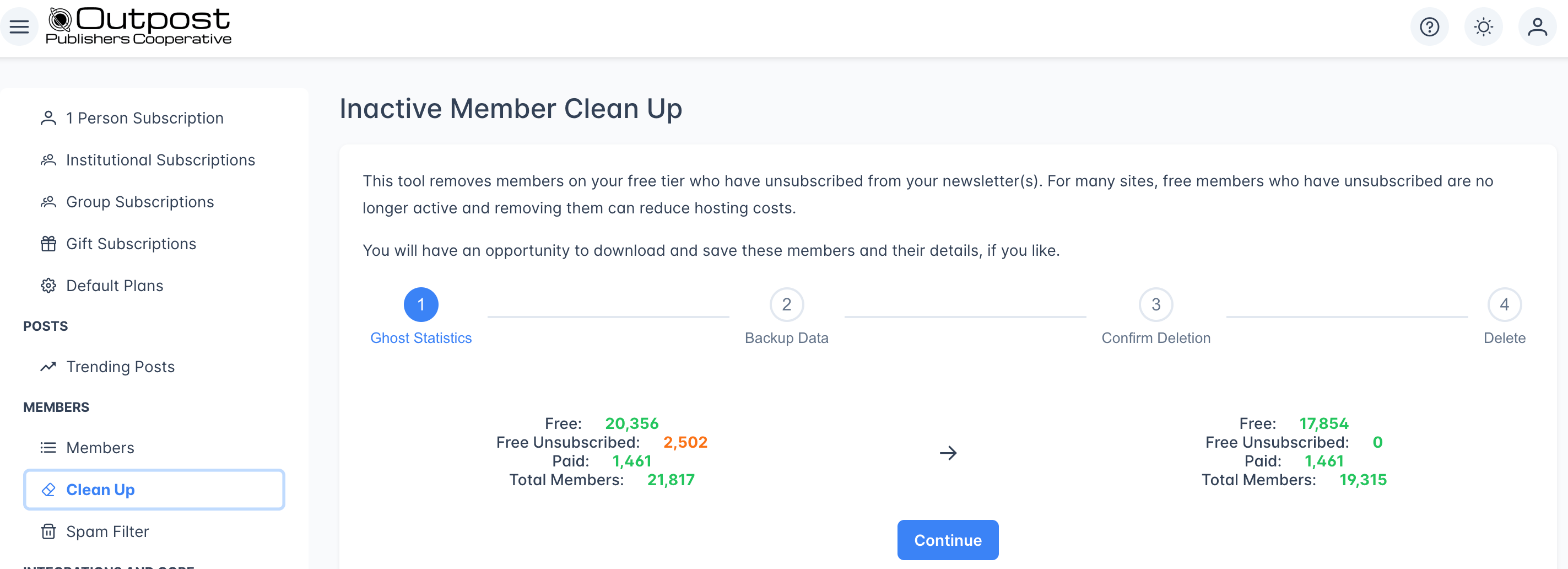
How it works
Member Cleanup is a guided 4-step wizard. Each step must be completed before moving to the next.1
Ghost Statistics
The first step shows a before-and-after comparison of your member counts:
If you have no unsubscribed free members, the Continue button will be disabled: there’s nothing to clean up.
2
Backup Data
Before deleting any members, you can download a CSV backup of the members that will be removed. This CSV contains their email addresses and profile details.Click Continue when you’re ready.
3
Confirm Deletion
Confirm that you want to remove the specified number of free members who unsubscribed. Click the red Yes, I want to remove these members from Ghost button to proceed.
4
Delete
Outpost removes the members in the background. Depending on the number of members being removed, this can take some time. You’ll receive an email notification (sent to your account email) when the cleanup is complete.You can safely navigate away from this page: the cleanup will continue running.
What gets removed
- Free-tier members whose newsletter subscription status is set to unsubscribed
- These members are removed from both Outpost and Ghost
What stays untouched
- Paid members (even if unsubscribed from newsletters)
- Complimentary members
- Gift subscription recipients
- Group subscription members
- Free members who are still subscribed to at least one newsletter
Related features
Members
View and manage your full member list.
Spam Filtering
Block spam signups with email, domain, or keyword rules.
Data Export
Export your member list or segments to CSV.
FAQ
Will this remove paid members who unsubscribed from emails?
Will this remove paid members who unsubscribed from emails?
No. Member Cleanup only removes free-tier members who have unsubscribed. Paid, complimentary, gifted, and group members are never affected, even if they’ve turned off email notifications.
Can I undo a cleanup after it's done?
Can I undo a cleanup after it's done?
No. Once members are removed, the action cannot be undone. If you downloaded the backup CSV in Step 2, you can re-import those members into Ghost, but they will return as new free members without their original signup dates or activity history.
How long does the cleanup take?
How long does the cleanup take?
It depends on how many members are being removed. A few hundred members may take just a few minutes. Larger cleanups (thousands of members) may take longer. You’ll receive an email when it’s complete.
Why would I want to remove unsubscribed free members?
Why would I want to remove unsubscribed free members?
Many Ghost hosting plans charge based on member count. Free members who have unsubscribed from your newsletters are unlikely to re-engage: they don’t receive your emails and don’t pay for content. Removing them reduces your hosting costs and gives you a more accurate count of your active audience.
How often should I run Member Cleanup?
How often should I run Member Cleanup?
That’s up to you. Some publications run it monthly, others quarterly. Check the statistics in Step 1 periodically to see if you have a significant number of unsubscribed free members accumulating.