Privacy-friendly web analytics for your Ghost publication, hosted by Outpost on a shared Plausible account.
Plausible is a privacy-friendly, open-source web analytics alternative to Google Analytics. Outpost runs and pays for a Plausible account that hosts each publisher’s site, so analytics work without you setting up your own Plausible subscription.
Outpost-hosted account. We run a Plausible account that holds many publisher sites. Outpost creates and pays for the account that contains your site.
Embedded dashboard. The Plausible dashboard appears inside Outpost so you can view traffic alongside your membership metrics. See Plausible Dashboard for what’s surfaced.
Direct Plausible login. You can also log into Plausible directly to see more data and configure things like custom events, goals, and funnels. We add publisher email addresses as users on the account.
Team access. Add as many people from your team as admins or viewers on the Plausible account. There is no limit.
No publisher API access. API access to the Outpost-hosted Plausible account is not available; analytics are read-only via the dashboard.
Plausible setup typically happens during Outpost’s onboarding, when the team adds your site to the shared Plausible account. From there it’s self-serve: Outpost generates a tracking snippet for your site that you copy from the integration screen and paste into Ghost.
1
Copy your Plausible snippet
In Outpost, go to Integrations → Plausible and copy the tracking snippet generated for your site. Copy the entire snippet block: it includes a second initialization line, and event tracking won’t work if you leave it out.
2
Add the snippet to Ghost
In Ghost, go to Settings → Code injection and paste the snippet into the Site Header section. Save. The script starts collecting traffic data immediately.
3
Open the embedded dashboard in Outpost
Once the script is live, traffic data appears in the Plausible Dashboard inside Outpost.
To set up custom events, configure goals, or invite team members to view the analytics, log into Plausible directly with the email Outpost added as a user. From there you can:
Manage team users (admins or viewers).
Configure goals, custom events, and funnels.
See data Outpost doesn’t surface in the embedded dashboard.
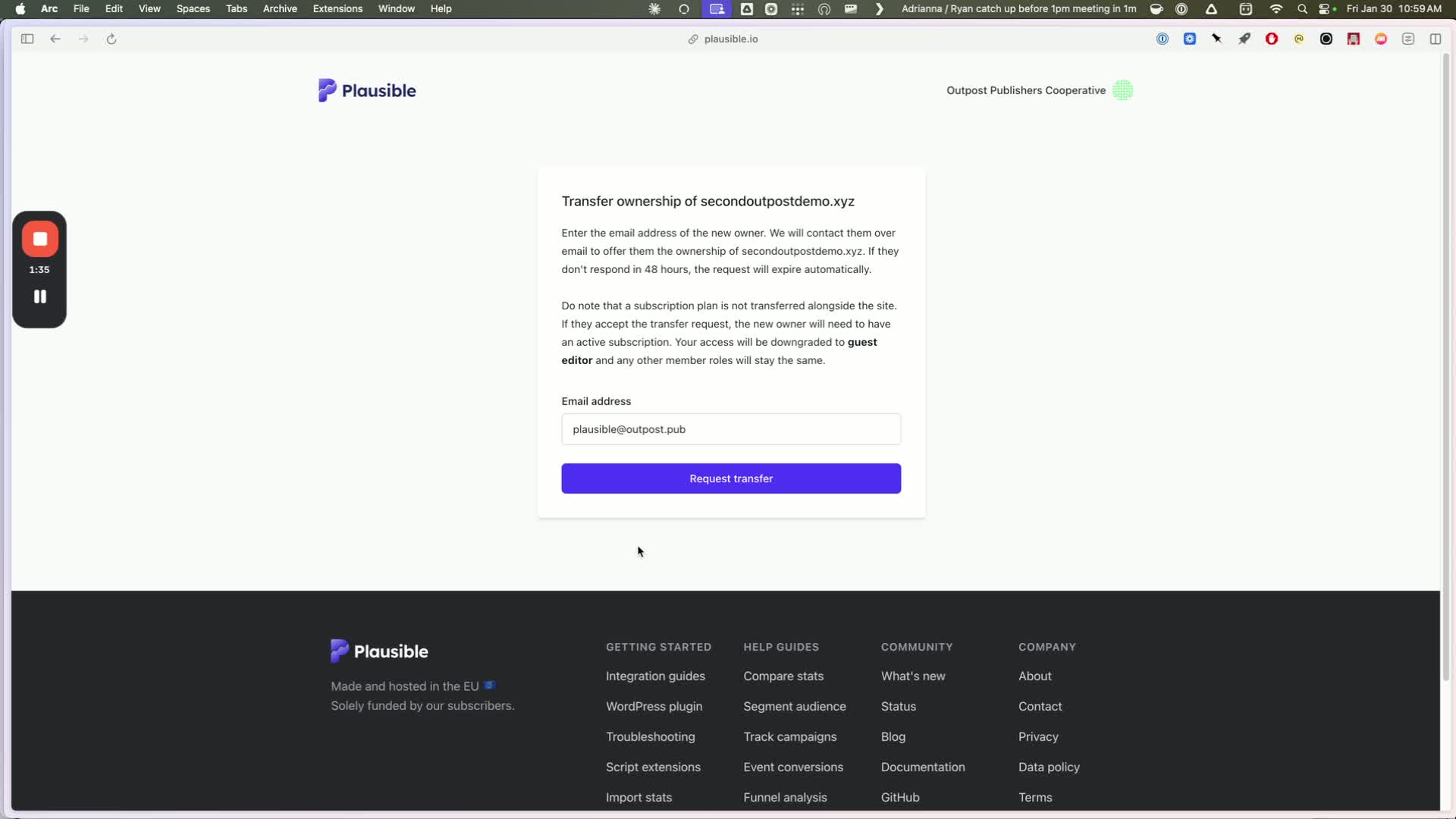
Plausible transfer ownership form with plausible@outpost.pub entered and Request transfer button
3
Tell Outpost the transfer is coming
Email support@outpost.pub so we accept the transfer and start paying for the account.
4
Confirm the dashboard appears in Outpost
Once accepted, the embedded dashboard should appear in your Outpost Control Center within a few minutes. If it doesn’t show up, go to Integrations → Plausible in Outpost and activate it.
5
Install the tracking snippet if it isn't already there
If your site doesn’t already have the Plausible tracking snippet installed, paste the one Outpost provides into Ghost → Code injection → Site Header.
6
Cancel your paid Plausible subscription
Back in Plausible, cancel your paid subscription so you aren’t double-billed. Cancelling does not delete your historical data: it only stops billing on your Plausible account.
Don’t skip the final step. If your Plausible subscription stays active after we take over billing, you’ll be paying twice. Email support@outpost.pub if you need help confirming the cutover.
If you leave Outpost and want to keep your Plausible analytics, we transfer ownership of the account to you and you take over the Plausible payment. Contact support@outpost.pub to start the transfer.
When you change your site’s address in Outpost, Outpost renames your site in Plausible to match, so your history stays on the same site, and it refreshes the embedded dashboard. This runs in the background, so it lands shortly after you save rather than the moment you save.Check the tracking snippet afterwards. Go to Integrations → Plausible in Outpost and compare the snippet shown there with the one in Ghost → Settings → Code injection. If they differ, copy the snippet from Outpost and replace the one in Ghost. Email support@outpost.pub if traffic stops appearing after an address change, or if you are also changing your URL structure.
No. Outpost runs and pays for the Plausible account that hosts your site.
Can I get API access to the analytics data?
Not on the Outpost-hosted Plausible account. Analytics are available through the embedded dashboard in Outpost and the Plausible web UI when you log in directly.
Can my team see the analytics?
Yes. Outpost can add anyone from your team as an admin or viewer on the Plausible account. Email support@outpost.pub with the email addresses to add.
What happens to my analytics if I leave Outpost?
We transfer ownership of the Plausible account to you. From that point you cover the Plausible bill directly and keep all your historical data. Contact support@outpost.pub when you’re ready to make the switch.